# Wallet: Choose, Connect

## What is a Cryptocurrency Wallet?

To learn more about cryptocurrency wallets and why you would want to set one up on your Sandbox account, view [**About Cryptocurrency Wallets**](https://docs.sandbox.game/en/manage/create#about-cryptocurrency-wallets).&#x20;

Below you can find information about supported wallets and how to connect one to a Sandbox account.

## Choosing a Wallet

The Sandbox officially supports some wallet types, with more possible additions in the future.

Choosing a wallet is entirely up to the user. We have provided information below to help you make your own free, independent decision about which one is right for you.

{% hint style="info" %}
**IMPORTANT NOTE**\
Some wallets are more suited to different purposes and experience levels. You can remove a wallet from your account and connect another. This does NOT affect the content in your wallet(s).
{% endhint %}

{% hint style="warning" %}
**RESTRICTIONS MAY APPLY**\
Some countries have restrictions on what you can do with a cryptocurrency wallet, but everyone is able to create and play for free.
{% endhint %}

{% hint style="danger" %}
**SECURITY TIP**\
Only download or register for a wallet from the official wallet provider's website, which are included below. There are occasionally fake websites that try to impersonate the real wallet provider's website.
{% endhint %}

## Supported Wallets

{% hint style="info" %}
Bitski wallets have been phased out. Learn more at <https://www.bitski.com/>.
{% endhint %}

<table data-card-size="large" data-column-title-hidden data-view="cards"><thead><tr><th>About</th><th>Partnership Article</th><th data-hidden data-card-cover data-type="files"></th><th data-hidden data-card-target data-type="content-ref"></th></tr></thead><tbody><tr><td>MetaMask is currently the most popular cryptocurrency wallet on the blockchain. It is a cross-device wallet that supports browser extensions, iOS and Android.</td><td><a href="https://medium.com/sandbox-game/partnership-announcement-the-sandbox-ft-metamask-7ac8faf005fb"><strong>MetaMask’s partnership with The Sandbox</strong></a></td><td><a href="https://3927767952-files.gitbook.io/~/files/v0/b/gitbook-x-prod.appspot.com/o/spaces%2F61fllYo416R30LRxku4v%2Fuploads%2FQNqwVyszxX3DzZNYFypi%2Fimage.png?alt=media&#x26;token=f6370079-18c5-47f2-a35a-92800e75cfbd">MetaMask logo card.png</a></td><td><a href="https://metamask.io/">https://metamask.io/</a></td></tr><tr><td>Coinbase is a US-based company which predominantly operates a cryptocurrency exchange platform, and now offers a wallet. It is the largest cryptocurrency exchange in the United States by trading volume.</td><td></td><td><a href="https://3927767952-files.gitbook.io/~/files/v0/b/gitbook-x-prod.appspot.com/o/spaces%2F61fllYo416R30LRxku4v%2Fuploads%2Fe0dWtlD6SpbM1uBeL5Sv%2Fimage.png?alt=media&#x26;token=b04298e6-c4af-44b8-86f3-9e21031c39cb">Coinbase logo card.png</a></td><td><a href="https://www.coinbase.com/">https://www.coinbase.com/</a></td></tr><tr><td>Venly, formerly known as Arkane, is a cryptocurrency wallet that makes it even easier for those who are new to the worlds of crypto and blockchain gaming to create a cryptocurrency wallet through social network logins.</td><td></td><td><a href="https://3927767952-files.gitbook.io/~/files/v0/b/gitbook-x-prod.appspot.com/o/spaces%2F61fllYo416R30LRxku4v%2Fuploads%2FfhCnprGwJwR9yrdgbSfy%2Fimage.png?alt=media&#x26;token=d47adadd-a49e-4383-a38b-20794bd7b83b">Venly logo card.png</a></td><td><a href="https://www.venly.io/">https://www.venly.io/</a></td></tr></tbody></table>

## Wallet Comparison

<table data-full-width="true"><thead><tr><th>Info</th><th>METAMASK</th><th>COINBASE</th><th>VENLY</th></tr></thead><tbody><tr><td>Wallet Type</td><td>Web3</td><td>Web3</td><td>Multi-blockchain</td></tr><tr><td>Browser Extension</td><td><span data-gb-custom-inline data-tag="emoji" data-code="2705">✅</span></td><td><span data-gb-custom-inline data-tag="emoji" data-code="2705">✅</span></td><td></td></tr><tr><td>Ethereum &#x26; Polygon</td><td><span data-gb-custom-inline data-tag="emoji" data-code="2705">✅</span></td><td><span data-gb-custom-inline data-tag="emoji" data-code="2705">✅</span></td><td><span data-gb-custom-inline data-tag="emoji" data-code="2705">✅</span></td></tr><tr><td>Setup Time</td><td>10 minutes</td><td>10 minutes</td><td>3 minutes</td></tr><tr><td>Difficulty Level</td><td>Medium</td><td>Medium</td><td>Very Easy</td></tr><tr><td>Community Feedback on Staking</td><td>Preferred</td><td></td><td>Not suitable</td></tr><tr><td>Users' General Experience Level with Blockchains, Blockchain Gaming, or Cryptocurrency</td><td>Moderate to extensive</td><td>Moderate to extensive</td><td>No experience, considered as a basic "entry wallet" for those new to the cryptocurrency space</td></tr><tr><td>Website</td><td><a href="https://metamask.io/">https://metamask.io/</a></td><td><a href="https://www.coinbase.com/">https://www.coinbase.com/</a></td><td><a href="https://www.venly.io/">https://www.venly.io/</a></td></tr></tbody></table>

## Connect a Wallet

### During Sandbox Account Creation

{% tabs %}
{% tab title="1. Select a Tab ➡️" %}
Press the tabs to open step-by-step instructions to set up each supported wallet type while you sign up for a Sandbox account.
{% endtab %}

{% tab title="MetaMask" %}
**1.** If you don't have a MetaMask wallet yet, you can create a MetaMask account and install the MetaMask extension on your browser from their official website here: [**https://metamask.io/**](https://metamask.io/). This video is a helpful guide for the process:

{% embed url="<https://youtu.be/ZIGUC9JAAw8>" %}

{% hint style="danger" %}
During wallet registration, you will be given a security keyphrase consisting of some randomly-generated words. Make sure you save this, including as a hard-copy off of your device. This should be kept safe and must never shared with anyone.
{% endhint %}

**2.** Once you have your MetaMask wallet set up and the browser extension installed, visit The Sandbox website at [**https://www.sandbox.game**](https://www.sandbox.game). Press **Create Account** in the top-right of the webpage.

![](https://3927767952-files.gitbook.io/~/files/v0/b/gitbook-x-prod.appspot.com/o/spaces%2F61fllYo416R30LRxku4v%2Fuploads%2FCePK5hY0TLHCQT596DS1%2Fimage.png?alt=media\&token=73dcca5e-5a18-480c-bfa2-2a94a8a5187a)

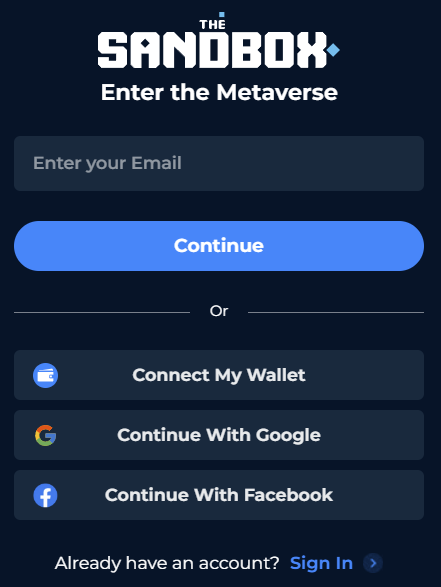
**3.** Press **Connect My Wallet** on the list of options.

<div align="left"><figure><img src="https://3927767952-files.gitbook.io/~/files/v0/b/gitbook-x-prod.appspot.com/o/spaces%2F61fllYo416R30LRxku4v%2Fuploads%2Fg8eUSRZm513CbR4kexsW%2Fimage.png?alt=media&#x26;token=d0ef59d8-0e00-4a32-b9a9-256f4c615515" alt="" width="331"><figcaption></figcaption></figure></div>

**4.** A list of wallet options will appear. Select the **MetaMask** option.

![](https://3927767952-files.gitbook.io/~/files/v0/b/gitbook-x-prod.appspot.com/o/spaces%2F61fllYo416R30LRxku4v%2Fuploads%2FWbM4K9l7RYcWm5GaLEsd%2Fimage.png?alt=media\&token=2a9669ed-7bce-4908-85fb-5e2d6320150a)

**5.** The MetaMask browser extension will prompt you to sign in with your password and sign a signature request that will allow MetaMask to log you into The Sandbox. Click the **Sign** button on this prompt. You will not be charged any gas fees to confirm this action.

![](https://3927767952-files.gitbook.io/~/files/v0/b/gitbook-x-prod.appspot.com/o/spaces%2F61fllYo416R30LRxku4v%2Fuploads%2FAJp9hW28dTUGGiB7QANP%2Fimage.png?alt=media\&token=0c070d2c-25b3-4ab0-b137-19f9579f84a8)

There you have it — you now own a MetaMask cryptocurrency wallet which will enable you to access The Sandbox, make purchases and store your crypto tokens like [**SAND**](https://docs.sandbox.game/en/owners/sand) and [**LAND**](https://docs.sandbox.game/en/owners/land).
{% endtab %}

{% tab title="Coinbase" %}
**1.** If you don't have a Coinbase wallet yet, you can [**create an Coinbase account**](https://www.coinbase.com/) and [**download the official wallet browser extension**](https://www.coinbase.com/wallet) first, or follow the wallet setup through The Sandbox website at [**https://www.sandbox.game**](https://www.sandbox.game).\
\
**2.** Once you have your Coinbase wallet set up and the browser extension installed, sign in to your Sandbox account at [**https://www.sandbox.game**](https://www.sandbox.game). Press **Create Account** in the top-right of the webpage.

![](https://3927767952-files.gitbook.io/~/files/v0/b/gitbook-x-prod.appspot.com/o/spaces%2F61fllYo416R30LRxku4v%2Fuploads%2FCePK5hY0TLHCQT596DS1%2Fimage.png?alt=media\&token=73dcca5e-5a18-480c-bfa2-2a94a8a5187a)

**3.** Press **Connect My Wallet** on the list of options.

<div align="left"><figure><img src="https://3927767952-files.gitbook.io/~/files/v0/b/gitbook-x-prod.appspot.com/o/spaces%2F61fllYo416R30LRxku4v%2Fuploads%2Fg8eUSRZm513CbR4kexsW%2Fimage.png?alt=media&#x26;token=d0ef59d8-0e00-4a32-b9a9-256f4c615515" alt="" width="331"><figcaption></figcaption></figure></div>

\
**4.** A list of wallet options will appear. Select the **Coinbase Wallet** option.

![](https://3927767952-files.gitbook.io/~/files/v0/b/gitbook-x-prod.appspot.com/o/spaces%2F61fllYo416R30LRxku4v%2Fuploads%2FWbM4K9l7RYcWm5GaLEsd%2Fimage.png?alt=media\&token=2a9669ed-7bce-4908-85fb-5e2d6320150a)

**3.** You will be prompted to install the Coinbase Wallet extension if you haven't yet, or you can use the Coinbase Wallet app on your mobile phone to scan a QR code to connect your existing Coinbase wallet.\
![](https://3927767952-files.gitbook.io/~/files/v0/b/gitbook-x-prod.appspot.com/o/spaces%2F61fllYo416R30LRxku4v%2Fuploads%2FX3WYlVgmwTgomUgT1fwq%2Fimage.png?alt=media\&token=42f6f779-7cb2-4144-80ab-a82aab3e4682)\
\
**4.** If you choose to setup by installing the extension, you'll be brought to the extension's install page in your browser.

![](https://3927767952-files.gitbook.io/~/files/v0/b/gitbook-x-prod.appspot.com/o/spaces%2F61fllYo416R30LRxku4v%2Fuploads%2FyKshFMe0yM8RSsOl30Tx%2Fimage.png?alt=media\&token=7f56158e-a1cd-495f-a018-7dbc8192d62c)

When you complete this and return to the Sandbox page, you'll be prompted to reload the page. After this, follow the remaining instructions to create a new wallet or connect an existing wallet.

![](https://3927767952-files.gitbook.io/~/files/v0/b/gitbook-x-prod.appspot.com/o/spaces%2F61fllYo416R30LRxku4v%2Fuploads%2FOAFg3LVst1ksSVyLz8zq%2Fimage.png?alt=media\&token=9c1e6d1f-d081-463a-bc17-4b240f5f5a8b)

**5.** You will be prompted to sign a signature request that will allow Coinbase to log you into The Sandbox. Click the **Sign** button on this prompt. You will not be charged any gas fees to confirm this action.

There you have it — you now own a Coinbase cryptocurrency wallet which will enable you to access The Sandbox, make purchases and store your crypto tokens like [**SAND**](https://docs.sandbox.game/en/owners/sand) and [**LAND**](https://docs.sandbox.game/en/owners/land).
{% endtab %}

{% tab title="Venly" %}
**1.** Sign in to your Sandbox account at [**https://www.sandbox.game**](https://www.sandbox.game). Press **Create Account** in the top-right of the webpage.

![](https://3927767952-files.gitbook.io/~/files/v0/b/gitbook-x-prod.appspot.com/o/spaces%2F61fllYo416R30LRxku4v%2Fuploads%2FCePK5hY0TLHCQT596DS1%2Fimage.png?alt=media\&token=73dcca5e-5a18-480c-bfa2-2a94a8a5187a)

**2.** Press **Connect My Wallet** on the list of options. You can also choose to use your Google or Facebook accounts as social logins.

<div align="left"><figure><img src="https://3927767952-files.gitbook.io/~/files/v0/b/gitbook-x-prod.appspot.com/o/spaces%2F61fllYo416R30LRxku4v%2Fuploads%2Fg8eUSRZm513CbR4kexsW%2Fimage.png?alt=media&#x26;token=d0ef59d8-0e00-4a32-b9a9-256f4c615515" alt="" width="221"><figcaption></figcaption></figure></div>

\
**3.** A list of wallet options will appear. Select the **Venly** wallet option.

![](https://3927767952-files.gitbook.io/~/files/v0/b/gitbook-x-prod.appspot.com/o/spaces%2F61fllYo416R30LRxku4v%2Fuploads%2FWbM4K9l7RYcWm5GaLEsd%2Fimage.png?alt=media\&token=2a9669ed-7bce-4908-85fb-5e2d6320150a)<br>

**4.** Follow the prompts from the screen below to either enter your email to log in to your existing Venly account or create a new one. You will be prompted to enter your Venly password to authorize it to log into your Sandbox account. You will not be charged any gas fees to confirm this action.

![](https://3927767952-files.gitbook.io/~/files/v0/b/gitbook-x-prod.appspot.com/o/spaces%2F61fllYo416R30LRxku4v%2Fuploads%2FQlaJIUqYHVVlEOSwTCuc%2Fimage.png?alt=media\&token=178fe0a1-fbb6-4034-933d-ae24a95cb846)

That’s it, you now have a Venly cryptocurrency wallet. Once you are connected, you can give yourself a unique username to use in The Sandbox, and enter an email address for important communication.

To access your Venly wallet at any time, go to their website, [**https://www.venly.io/**](https://www.venly.io/), click the button labelled **My Wallet** in the top-right and log in.
{% endtab %}
{% endtabs %}

### After Sandbox Account Creation

{% tabs %}
{% tab title="1. Select a Tab ➡️" %}
Press the tabs to open step-by-step instructions to set up each supported wallet type after you have created your Sandbox account.
{% endtab %}

{% tab title="MetaMask" %}
**1.** First, you will need to set up your MetaMask account and install the MetaMask extension on your browser. You can skip this step if you already have an account. \
\
Create a MetaMask account and download the extension from their official website here: <https://metamask.io/>. This video is a helpful guide for the process:

{% embed url="<https://youtu.be/ZIGUC9JAAw8>" %}

{% hint style="danger" %}
During wallet registration, you will be given a security keyphrase consisting of some randomly-generated words. Make sure you save this, including as a hard-copy off of your device. This should be kept safe and must never shared with anyone.
{% endhint %}

**2.** Once you have your MetaMask wallet set up and the browser extension installed, sign in to your Sandbox account at [**https://www.sandbox.game**](https://www.sandbox.game) and then open your [**Profile**](https://www.sandbox.game/en/me/profile/).

**3.** Click the **Connect Your Wallet** button, which is underneath the **My Wallet** section of your profile.

<figure><img src="https://3927767952-files.gitbook.io/~/files/v0/b/gitbook-x-prod.appspot.com/o/spaces%2F61fllYo416R30LRxku4v%2Fuploads%2FTLCqOT4nyy6k63qyR66g%2Fimage.png?alt=media&#x26;token=9bab7b75-15f2-4703-b34e-408f311de02d" alt=""><figcaption></figcaption></figure>

**4.** A list of wallet options will appear. Select the **MetaMask** option.

![](https://3927767952-files.gitbook.io/~/files/v0/b/gitbook-x-prod.appspot.com/o/spaces%2F61fllYo416R30LRxku4v%2Fuploads%2FWbM4K9l7RYcWm5GaLEsd%2Fimage.png?alt=media\&token=2a9669ed-7bce-4908-85fb-5e2d6320150a)

**5.** The MetaMask browser extension will prompt you to sign in with your password and sign a signature request that will allow MetaMask to log you into The Sandbox. Click the **Sign** button on this prompt. You will not be charged any gas fees to confirm this action.

![](https://3927767952-files.gitbook.io/~/files/v0/b/gitbook-x-prod.appspot.com/o/spaces%2F61fllYo416R30LRxku4v%2Fuploads%2FAJp9hW28dTUGGiB7QANP%2Fimage.png?alt=media\&token=0c070d2c-25b3-4ab0-b137-19f9579f84a8)

There you have it — you now own a MetaMask cryptocurrency wallet which will enable you to access The Sandbox, make purchases and store your crypto tokens like [**SAND** ](https://docs.sandbox.game/en/owners/sand)and [**LAND**](https://docs.sandbox.game/en/owners/land).
{% endtab %}

{% tab title="Coinbase" %}
**1.** You can [**create an Coinbase account**](https://www.coinbase.com/) and [**download the official wallet browser extension**](https://www.coinbase.com/wallet) first, or follow the wallet setup through The Sandbox website. Sign in to your Sandbox account at [**https://www.sandbox.game**](https://www.sandbox.game) and then open your [**Profile**](https://www.sandbox.game/en/me/profile/).

**2.** Click the **Connect Your Wallet** button, which is underneath the **My Wallet** section of your profile.

<figure><img src="https://3927767952-files.gitbook.io/~/files/v0/b/gitbook-x-prod.appspot.com/o/spaces%2F61fllYo416R30LRxku4v%2Fuploads%2FTLCqOT4nyy6k63qyR66g%2Fimage.png?alt=media&#x26;token=9bab7b75-15f2-4703-b34e-408f311de02d" alt=""><figcaption></figcaption></figure>

**4.** A list of wallet options will appear. Select the **Coinbase** wallet option.

![](https://3927767952-files.gitbook.io/~/files/v0/b/gitbook-x-prod.appspot.com/o/spaces%2F61fllYo416R30LRxku4v%2Fuploads%2FWbM4K9l7RYcWm5GaLEsd%2Fimage.png?alt=media\&token=2a9669ed-7bce-4908-85fb-5e2d6320150a)

**3.** You will be prompted to install the Coinbase Wallet extension if you haven't yet, or you can use the Coinbase Wallet app on your mobile phone to scan a QR code to connect your existing Coinbase wallet.\
![](https://3927767952-files.gitbook.io/~/files/v0/b/gitbook-x-prod.appspot.com/o/spaces%2F61fllYo416R30LRxku4v%2Fuploads%2FX3WYlVgmwTgomUgT1fwq%2Fimage.png?alt=media\&token=42f6f779-7cb2-4144-80ab-a82aab3e4682)\
\
**4.** If you choose to setup by installing the extension, you'll be brought to the extension's install page in your browser.

![](https://3927767952-files.gitbook.io/~/files/v0/b/gitbook-x-prod.appspot.com/o/spaces%2F61fllYo416R30LRxku4v%2Fuploads%2FyKshFMe0yM8RSsOl30Tx%2Fimage.png?alt=media\&token=7f56158e-a1cd-495f-a018-7dbc8192d62c)

When you complete this and return to the Sandbox page, you'll be prompted to reload the page. After this, follow the remaining instructions to create a new wallet or connect an existing wallet.

![](https://3927767952-files.gitbook.io/~/files/v0/b/gitbook-x-prod.appspot.com/o/spaces%2F61fllYo416R30LRxku4v%2Fuploads%2FOAFg3LVst1ksSVyLz8zq%2Fimage.png?alt=media\&token=9c1e6d1f-d081-463a-bc17-4b240f5f5a8b)

**5.** You will be prompted to sign a signature request that will allow Coinbase to log you into The Sandbox. Click the **Sign** button on this prompt. You will not be charged any gas fees to confirm this action.

There you have it — you now own a Coinbase cryptocurrency wallet which will enable you to access The Sandbox, make purchases and store your crypto tokens like [**SAND**](https://docs.sandbox.game/en/owners/sand) and [**LAND**](https://docs.sandbox.game/en/owners/land).
{% endtab %}

{% tab title="Venly" %}
**1.** Sign in to your Sandbox account at [**https://www.sandbox.game**](https://www.sandbox.game) and then open your [**Profile**](https://www.sandbox.game/en/me/profile/).

**2.** Click the **Connect Your Wallet** button, which is underneath the **My Wallet** section of your profile.

<figure><img src="https://3927767952-files.gitbook.io/~/files/v0/b/gitbook-x-prod.appspot.com/o/spaces%2F61fllYo416R30LRxku4v%2Fuploads%2FTLCqOT4nyy6k63qyR66g%2Fimage.png?alt=media&#x26;token=9bab7b75-15f2-4703-b34e-408f311de02d" alt=""><figcaption></figcaption></figure>

**3.** A list of wallet options will appear. Select the **Venly** option.

![](https://3927767952-files.gitbook.io/~/files/v0/b/gitbook-x-prod.appspot.com/o/spaces%2F61fllYo416R30LRxku4v%2Fuploads%2FWbM4K9l7RYcWm5GaLEsd%2Fimage.png?alt=media\&token=2a9669ed-7bce-4908-85fb-5e2d6320150a)

**4.** Follow the prompts from the screen below to either enter your email to log in to your existing Venly account or create a new one. You will be prompted to enter your Venly password to authorize it to log into your Sandbox account. You will not be charged any gas fees to confirm this action.

![](https://3927767952-files.gitbook.io/~/files/v0/b/gitbook-x-prod.appspot.com/o/spaces%2F61fllYo416R30LRxku4v%2Fuploads%2FQlaJIUqYHVVlEOSwTCuc%2Fimage.png?alt=media\&token=178fe0a1-fbb6-4034-933d-ae24a95cb846)

That’s it, you now have a Venly cryptocurrency wallet. Once you are connected, you can give yourself a unique username to use in The Sandbox, and enter an email address for important communication.

To access your Venly wallet at any time, go to their website, [**https://www.venly.io/**](https://www.venly.io/), click the button labelled **My Wallet** in the top-right and log in.
{% endtab %}
{% endtabs %}
