# Experience Art Concept

## What is a Mood Board?

A mood board is a way to shape your thoughts and share your vision with others. It makes it easy for you to identify what you **like** or **don't like** when making design choices to arrive at a fine-tuned vision for your project.

{% hint style="success" %}
**WORLDBUILDING**

Choosing a [**worldbuilding**](/en/creator/game-maker/creative-guides/experience-design-techniques/narrative-design/worldbuilding.md) approach will help define your focus and streamline your search terms and AI prompts when building a mood board.
{% endhint %}

### Examples by The Sandbox

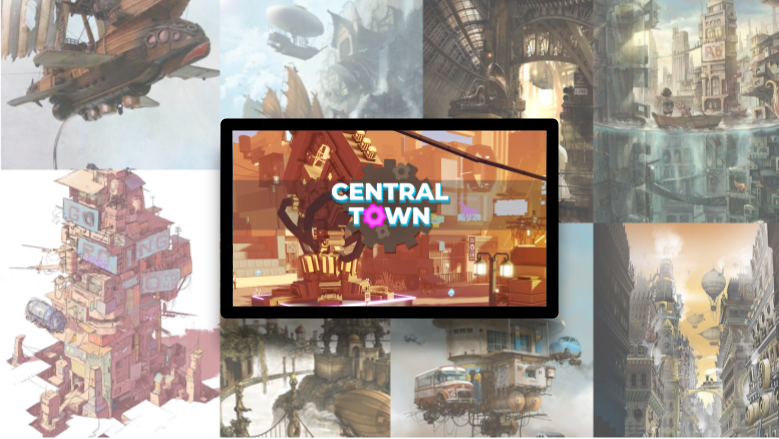
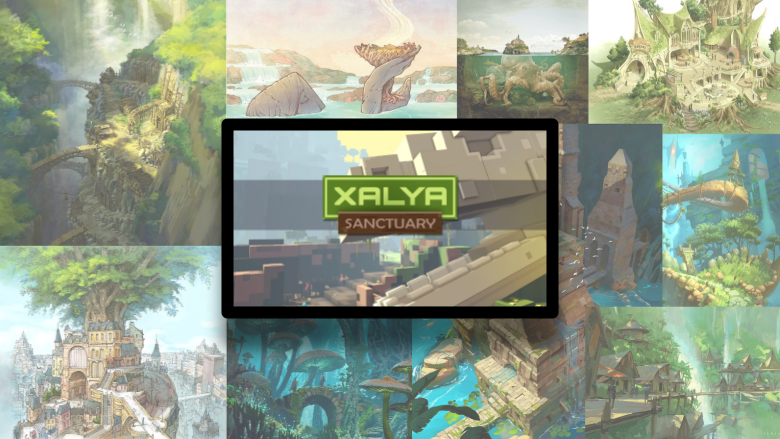
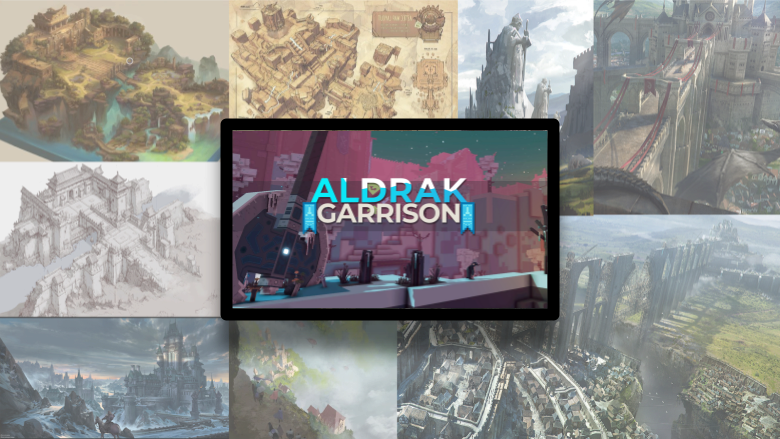
The Sandbox designed three distinct factions of people with a [**world-first worldbuilding**](/en/creator/game-maker/creative-guides/experience-design-techniques/narrative-design/worldbuilding.md#world-first-worldbuilding) approach. The examples below compare each faction's planning mood boards and resulting loading screen game art.

{% tabs %}
{% tab title="Heroes" %}

### Heroes Faction

<div data-full-width="false"><figure><img src="/files/Z4MP1n4KJnaskOqIWGfN" alt=""><figcaption><p>Heroes Faction by The Sandbox Game</p></figcaption></figure></div>
{% endtab %}

{% tab title="Scientists" %}

### Scientists Faction

<figure><img src="/files/SOGq0gvNOxF0A7XtgpCo" alt=""><figcaption><p>Scientists Faction by The Sandbox Game</p></figcaption></figure>
{% endtab %}

{% tab title="Oracles" %}

### Oracles Faction

<div data-full-width="false"><figure><img src="/files/VJy27bVfKDCdcV924WmU" alt=""><figcaption><p>Oracles Faction by The Sandbox Game</p></figcaption></figure></div>
{% endtab %}
{% endtabs %}

### Creating a Mood Board

<table data-card-size="large" data-view="cards"><thead><tr><th></th><th></th></tr></thead><tbody><tr><td><strong>Useful Tools to Create a Mood Board</strong></td><td><ul><li><a href="https://milanote.com/">Milanote</a></li><li><a href="https://www.pinterest.com/">Pinterest</a></li><li><a href="https://www.google.com/slides/about/">Google Slides</a></li><li><a href="https://www.canva.com/">Canva</a></li></ul></td></tr><tr><td><strong>Useful Sources for Images</strong></td><td><ul><li><a href="https://www.artstation.com/">ArtStation</a></li><li><a href="https://www.pinterest.com/">Pinterest</a></li><li><a href="https://images.google.com/">Google image search</a></li><li><p>AI generation</p><ul><li><a href="https://www.canva.com/ai-art-generator/">Canva</a></li><li><a href="https://www.craiyon.com/">Craiyon</a></li><li><a href="https://walling.app/">Walling</a></li></ul></li></ul></td></tr></tbody></table>

## Art Style

The Sandbox has a simplified voxelised art style, but there can be a lot of variation within it!

When choosing your Experience's art style, consider:

<table data-card-size="large" data-view="cards" data-full-width="false"><thead><tr><th></th><th></th></tr></thead><tbody><tr><td><strong>Palette</strong></td><td>Plan cohesive colour use and mood with careful <a href="/pages/3UrQOmMLDlxPXpX1VCmA"><strong>Colour Choice &#x26; Strategy</strong></a>.<br><br>Use <a href="/pages/3UrQOmMLDlxPXpX1VCmA#new-light-behaviour"><strong>Light</strong></a> component and <a href="/pages/ACzDaPk3QI2cMHskWNPL"><strong>Post Process Effects</strong></a> behavior in Game maker to create mood without "repainting" assets.</td></tr><tr><td><strong>Texture</strong></td><td>Create the illusion of material types, depth, and surface details such as shine, damage, etc. See <a href="/pages/EKxjgotybpOL2v2F3zAi"><strong>Textures &#x26; Materials</strong></a><br><br><strong>Prioritise texture</strong> quality for assets players interact with the most visually or physically.</td></tr><tr><td><strong>3D Complexity: Cumulative Effects</strong><br>Using simple art (left) allows for more game assets and logic than complex art (right).</td><td><p><img src="/files/uqTz5uDvzfdW7Wsgu0rJ" alt=""><img src="/files/gziXDl6IG06pLJx2fLcM" alt=""><br></p><p><strong>Balance Makes for Better Performance</strong></p><ul><li>Prioritise logic: fewer assets, simpler art</li><li>Prioritise art: more assets, simpler logic</li></ul><p>Add complexity in noticeable areas, use simplicity as filler. <strong>Example:</strong> <a href="https://docs.sandbox.game/en/v/creators/voxedit/docs/ve-guidelines/node-efficiency#best-simplify-and-emphasise"><strong>Node Efficiency</strong></a></p></td></tr><tr><td><strong>Animation</strong></td><td><p><a href="/pages/Ig6SHAr0oBjyKyKaaMHk"><strong>VoxEdit templates</strong></a> include pre-made animations and customisable models.</p><p><br><strong>Below:</strong> Repurpose models for new uses</p><p><img src="/files/DaGM8As7bdTPZwktaO8p" alt=""><br></p><p>"<a href="/pages/Ig6SHAr0oBjyKyKaaMHk#unlocking-a-template"><strong>Unlock</strong></a>" a template to modify nodes for unique assets that reuse some animations.</p><p></p><p><strong>Prioritise animation</strong> for assets players will interact with the most visually or physically.</p></td></tr></tbody></table>

## Visual Hierarchy

Prioritize visual elements generally to begin deciding what kinds of assets your project needs most. The highest priority assets that players will see up close or interact with should have the most detail.

#### Example:

<table data-view="cards"><thead><tr><th>Experience Theme</th><th>Visual Elements (by priority)</th></tr></thead><tbody><tr><td>Space</td><td><ul><li>Environmental (none)</li><li>Vehicles (high)</li><li>Structures (medium)</li></ul></td></tr><tr><td>Farm</td><td><ul><li>Environmental (high)</li><li>Interactive props (high)</li><li>Buildings (medium)</li></ul></td></tr><tr><td>Underwater</td><td><ul><li>Environmental (high)</li><li>Creatures (high)</li><li>Structures (medium)</li></ul></td></tr></tbody></table>

### Commonly Used Visual Elements

A list of common visual elements, their general purpose, and examples are included below.

<table data-card-size="large" data-view="cards"><thead><tr><th></th><th></th></tr></thead><tbody><tr><td><span data-gb-custom-inline data-tag="emoji" data-code="1f3de">🏞️</span> <strong>Environmental</strong><br><em>Offer wide angle views or basic quest scenery</em></td><td>Trees, stumps, bushes, flowers, vines, etc.</td></tr><tr><td><span data-gb-custom-inline data-tag="emoji" data-code="1f5fc">🗼</span> <strong>Landmarks</strong><br><em>Draw players to gameplay areas thematically</em></td><td>Towers, ruins, formations, centerpieces</td></tr><tr><td><span data-gb-custom-inline data-tag="emoji" data-code="1f3d7">🏗️</span> <strong>Structures</strong><br><em>Offer access, interaction, and shape</em></td><td>Modular pipes, rails, doors, windows, etc.</td></tr><tr><td><span data-gb-custom-inline data-tag="emoji" data-code="1f693">🚓</span> <strong>Vehicles</strong><br><em>Define non-player character movement</em></td><td>Cars, trucks, trains, boats, spaceships, etc.</td></tr><tr><td><span data-gb-custom-inline data-tag="emoji" data-code="1f3e0">🏠</span> <strong>Buildings</strong><br><em>Define societal elements (home, work, fun)</em></td><td>Homes/apartments, office buildings, shops, sheds, barns, restaurants, etc.</td></tr><tr><td><span data-gb-custom-inline data-tag="emoji" data-code="1fa91">🪑</span><strong>Furniture</strong><br><em>Balance detail and space (visual, physical)</em></td><td>Tables/desks, chairs, cabinets, appliances, decor, rugs, lights, curtains, etc.</td></tr><tr><td><span data-gb-custom-inline data-tag="emoji" data-code="1f9cd">🧍</span><strong>Characters</strong><br><em>Engage and direct players, balance space</em></td><td>Quest NPCs, filler NPCs, quest enemies</td></tr><tr><td><span data-gb-custom-inline data-tag="emoji" data-code="1f409">🐉</span> <strong>Creatures</strong><br><em>Engage players emotionally, balance space</em></td><td>Animals, monsters, quest enemies, etc.</td></tr><tr><td><span data-gb-custom-inline data-tag="emoji" data-code="2694">⚔️</span> <strong>Equipment</strong><br><em>Immerse players and reward them</em></td><td>Weapons, shields, armour, clothing, tools, etc.</td></tr><tr><td><span data-gb-custom-inline data-tag="emoji" data-code="1f528">🔨</span> <strong>Interactive Props</strong><br><em>Engage players more naturally with objects</em></td><td><ul><li>Collectable (wood, fruit, coins, etc.)</li><li>Destructable (crates, barriers, etc.)</li><li>Interactive (buttons, platforms, etc.)</li></ul></td></tr></tbody></table>

### Ambience, Camera & Visual Effects

Prioritize the importance of settings to create a completely custom :blue\_square: [**Look & Feel**](/en/creator/basics/look-feel.md) for your Experience:

* weather
* music & sound effects
* camera
* visual effects

**Examples:**

If the sky is too saturated with bold colour, players may not notice assets in your Experience as well.

Music with lyrics may distract players who are trying to solve puzzles.

Visual effects add a lot of polish to an Experience, but may be distracting if used too much.

***

#### Additional Resource

Some information here can be viewed in the following Expert Creator Workshop:

{% embed url="<https://youtu.be/BERw4NolWh0?feature=shared>" %}
Expert Workshop: Creating an Art Design Document
{% endembed %}


---

# Agent Instructions: Querying This Documentation

If you need additional information that is not directly available in this page, you can query the documentation dynamically by asking a question.

Perform an HTTP GET request on the current page URL with the `ask` query parameter:

```
GET https://docs.sandbox.game/en/creator/game-maker/creative-guides/experience-design-techniques/art-design/experience-art-concept.md?ask=<question>
```

The question should be specific, self-contained, and written in natural language.
The response will contain a direct answer to the question and relevant excerpts and sources from the documentation.

Use this mechanism when the answer is not explicitly present in the current page, you need clarification or additional context, or you want to retrieve related documentation sections.