> For the complete documentation index, see [llms.txt](https://docs.sandbox.game/en/llms.txt). Markdown versions of documentation pages are available by appending `.md` to page URLs; this page is available as [Markdown](https://docs.sandbox.game/en/creator/game-maker/docs/behaviours/basic-logic/message-broadcaster.md).
# Message Broadcaster
Sends a message to activate another event.
{% hint style="success" %}
**COPY/PASTE PARAMETERS**
New in GM 0.11! Right click on a behaviour or component to copy. Then open an object, add the same behaviour or component, and right click it to paste identical parameter settings.
{% endhint %}
{% hint style="info" %}
[Build Singleplayer & Multiplayer Logic](/en/creator/game-maker/docs/build-singleplayer-and-multiplayer-logic.md) - about **\[SP]** or **\[MP]** behaviours or components.
{% endhint %}
##  Message Broadcaster \[SP] \[MP]
* Broadcast a message from the asset in a specific range - When you broadcast a message, you can trigger events the same way a button works (broadcast a message opening a door) - Can detect a target to create specific trigger conditions
## Parameters
| Options | Details |
| ------------------------------------------------------------------------------------------------------------------------------------------------------------------------------------------------------------------------------------------- | ----------------------------------------------------------------------------------------------------------------------------------------------------------------------------------------------------------------------------------------------------------------------------------------------------------------------------------------------------------------------------------------------------------------------------------------------------------------------------------------------------------------------------------------------------------------------------------------------------------------------------------------------------------------------------------- |
|  | **Message to Send** - Use a message from the menu or create your own message to send. |
|  |
Broadcast Type (everyone in range) - This option sets your Message Broadcaster to send messages to all objects in range.
Broadcast Range (slider) - defines the area in which your message broadcaster will send messages.
This parameter is visualised with a yellow circle Gizmo that adjusts as you move the slider or change the value.
Broadcast Type (Specific Tags in Range) - This option sets your Message Broadcaster to send messages to all objects in range with the specified tag(s).
Broadcast Range (slider) - defines the area in which your message broadcaster will send messages.
This parameter is visualised with a yellow circle Gizmo that adjusts as you move the slider or change the value.
Tags - Add or remove tags that the Message Broadcaster should send messages to.
Broadcast Type (Selected Actors) - This option lets you select a specific Object to send your messages to.
Targets - Add or remove the Objects that you want the Message Broadcaster to send messages to (must be placed in your experience).
|
|  | **Broadcast Type** (All) - Send messages to all Objects in your experience. |
|
|
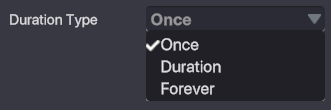
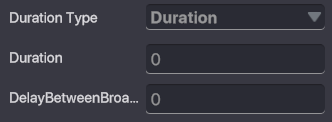
Duration Type Once - one time Duration - set amount of time in seconds and delay between broadcasts Forever - broadcast forever with a delay between broadcasts
Wait Before Broadcast - Toggle on or off to determine if the Message Broadcaster should start broadcasting at the beginning of the game or wait until it receives a message.
Message Required - Add or remove messages required to activate your Message Broadcaster.
|
|  | **Broadcast Only Once** - Toggle on or off to determine whether your Message Broadcaster should be able to broadcast its messages one or more times. |
---
# Agent Instructions
This documentation is published with GitBook. GitBook is the documentation platform designed so that both humans and AI agents can read, navigate, and reason over technical content effectively. Learn more at gitbook.com.
## Querying This Documentation
If you need additional information that is not directly available in this page, you can query the documentation by asking a question.
Perform an HTTP GET request on the following URL with the `ask` and `goal` query parameters:
```
GET https://docs.sandbox.game/en/creator/game-maker/docs/behaviours/basic-logic/message-broadcaster.md?ask=&goal=
```
`ask` is the immediate question: it should be specific, self-contained, and written in natural language.
`goal` is what the user is ultimately trying to achieve, the reason they need the answer. Sharing it helps GitBook give you a better, more relevant answer. A goal is most helpful when it describes the outcome the user wants rather than restating the question. For example, with `ask=how do I create an API token`, a goal like `automate deployments from our CI pipeline` lets GitBook tailor the answer to that use case.
The response will contain a direct answer to the question and relevant excerpts and sources from the documentation.
Use this mechanism when the answer is not explicitly present in the current page, you need clarification or additional context, or you want to retrieve related documentation sections.