# Asset Spawner

{% hint style="success" %}
**COPY/PASTE PARAMETERS**

New in GM 0.11! Right click on a behaviour or component to copy. Then open an object, add the same behaviour or component, and right click it to paste identical parameter settings.
{% endhint %}

{% hint style="info" %}
[Build Singleplayer & Multiplayer Logic](/en/creator/game-maker/docs/build-singleplayer-and-multiplayer-logic.md) - about <mark style="color:green;">**\[SP]**</mark> or <mark style="color:yellow;">**\[MP]**</mark> behaviours or components.
{% endhint %}

## ![](/files/UexLuvRm0mEiTmuDXybw) Asset Spawner <mark style="color:green;">\[SP]</mark> <mark style="color:yellow;">\[MP]</mark>

* Trigger an Asset or [**Preset**](/en/creator/game-maker/docs/build-menus/side-bar/presets.md#spawn-presets-during-gameplay) to appear at a specific location during gameplay

### Common Uses

* Loot from opened items like chests, crates, etc.
* Replenishing enemy or wildlife supply (which could provide players with dropped resources)
* Adding content to a scene as part of the game's narrative

***

## How it Works

### Trigger: <img src="/files/MXqo7fq0mdij5mtZvsVz" alt="" data-size="line"> Multiple messages in

### Action: Spawn Asset or Preset

Spawn once or when triggered (with a delay) at a precise offset location.

<figure><img src="/files/UlmPCyGtBXAS1AfZ0V4j" alt="" width="375"><figcaption><p>Asset Spawner behaviour can create new objects during play, <br>triggered by messages sent such as this Asker Behaviour.</p></figcaption></figure>

{% hint style="success" %}
Asset Spawner behaviour sets a specific spawn location. [Drop](/en/creator/game-maker/docs/components/actions/drop.md) component does not.
{% endhint %}

### Out: No messages sent

***

## Parameter Notes

{% hint style="info" %}
*<mark style="color:green;">**Green text**</mark>* means settings are applied to the spawned object.
{% endhint %}

{% hint style="success" %}
If you need to spawn something with custom settings, create a Preset to spawn.
{% endhint %}

| ![](/files/152UITk6fXIoUtfQaARn)                                                                        | **Spawn Offset** - set the location of the spawned object in relation to the Spawner using <mark style="color:red;">**X**</mark>, <mark style="color:green;">**Y**</mark>, and <mark style="color:blue;">**Z**</mark> coordinates.                                                                                                                                                                                                                                                                                                                                                                                                                               |
| ------------------------------------------------------------------------------------------------------- | ---------------------------------------------------------------------------------------------------------------------------------------------------------------------------------------------------------------------------------------------------------------------------------------------------------------------------------------------------------------------------------------------------------------------------------------------------------------------------------------------------------------------------------------------------------------------------------------------------------------------------------------------------------------- |
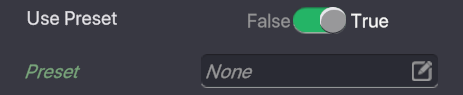
| <p><img src="/files/tClisFz9x8UP5vLEda2c" alt=""><br><img src="/files/KxZkJLh15SFm2sj4ChQ7" alt=""></p> | <p><strong>Use Preset</strong></p><ul><li><strong>False</strong> - the <em><mark style="color:green;">Asset to Spawn</mark></em>, <em><mark style="color:green;">Behaviour</mark></em>, <em><mark style="color:green;">Tags</mark><strong>,</strong> <mark style="color:green;">Components</mark></em>, and <em><mark style="color:green;">Physics</mark></em> fields will appear to select an Asset to spawn and set properties.</li><li><strong>True</strong> - the <em><mark style="color:green;">Preset</mark></em> field will appear so you can open the popup window and select from one of your Presets, which already have defined properties.</li></ul> |
| <img src="/files/BecnNNtmh7E4gTIVkFgU" alt="" data-size="original">                                     | <mark style="color:green;">**Delay Between Spawns**</mark> - set the time in seconds that must pass before the Spawner can be triggered again to prevent players from spamming the spawner too quickly.                                                                                                                                                                                                                                                                                                                                                                                                                                                          |


---

# Agent Instructions: Querying This Documentation

If you need additional information that is not directly available in this page, you can query the documentation dynamically by asking a question.

Perform an HTTP GET request on the current page URL with the `ask` query parameter:

```
GET https://docs.sandbox.game/en/creator/game-maker/docs/behaviours/modifiers/asset-spawner.md?ask=<question>
```

The question should be specific, self-contained, and written in natural language.
The response will contain a direct answer to the question and relevant excerpts and sources from the documentation.

Use this mechanism when the answer is not explicitly present in the current page, you need clarification or additional context, or you want to retrieve related documentation sections.