# Void

{% hint style="success" %}
**COPY/PASTE PARAMETERS**

New in GM 0.11! Right click on a behaviour or component to copy. Then open an object, add the same behaviour or component, and right click it to paste identical parameter settings.
{% endhint %}

<table data-card-size="large" data-view="cards"><thead><tr><th></th><th></th><th data-hidden data-card-cover data-type="files"></th></tr></thead><tbody><tr><td><strong>Ported for Multiplayer Compatibility (0.10)</strong></td><td>Destroy blocks and/or assets colliding within a specified area during gameplay</td><td><a href="https://331512196-files.gitbook.io/~/files/v0/b/gitbook-x-prod.appspot.com/o/spaces%2F83PS3g9zpWmq73xzlwFn%2Fuploads%2FrOGCWocS4lMb0fTMy2I5%2FGM%20Multi%20and%20Void%20behaviors%20port%20sm%20opt.gif?alt=media&#x26;token=d6cd5813-a3a6-4487-819a-6549c3c93099">GM Multi and Void behaviors port sm opt.gif</a></td></tr><tr><td></td><td></td><td></td></tr></tbody></table>

{% hint style="info" %}
[build-singleplayer-and-multiplayer-logic](https://docs.sandbox.game/en/creator/game-maker/docs/build-singleplayer-and-multiplayer-logic "mention") - about <mark style="color:green;">**\[SP]**</mark> or <mark style="color:yellow;">**\[MP]**</mark> behaviours or components.
{% endhint %}

## ![](https://331512196-files.gitbook.io/~/files/v0/b/gitbook-x-prod.appspot.com/o/spaces%2F83PS3g9zpWmq73xzlwFn%2Fuploads%2FJACRMk8jh1jOzLiBlYiv%2Fimage.png?alt=media\&token=4f182ede-1d9c-4b47-b781-f807bec188ac) Void <mark style="color:yellow;">\[MP]</mark>

* Destroys specified blocks and/or assets during gameplay

## Common Uses

* Destroying specific types of blocks to reveal something
* Opening the way to new areas that can't be accessed any other way
* Removing block layers to make it appear like water, lava, etc. is flowing

## Communications

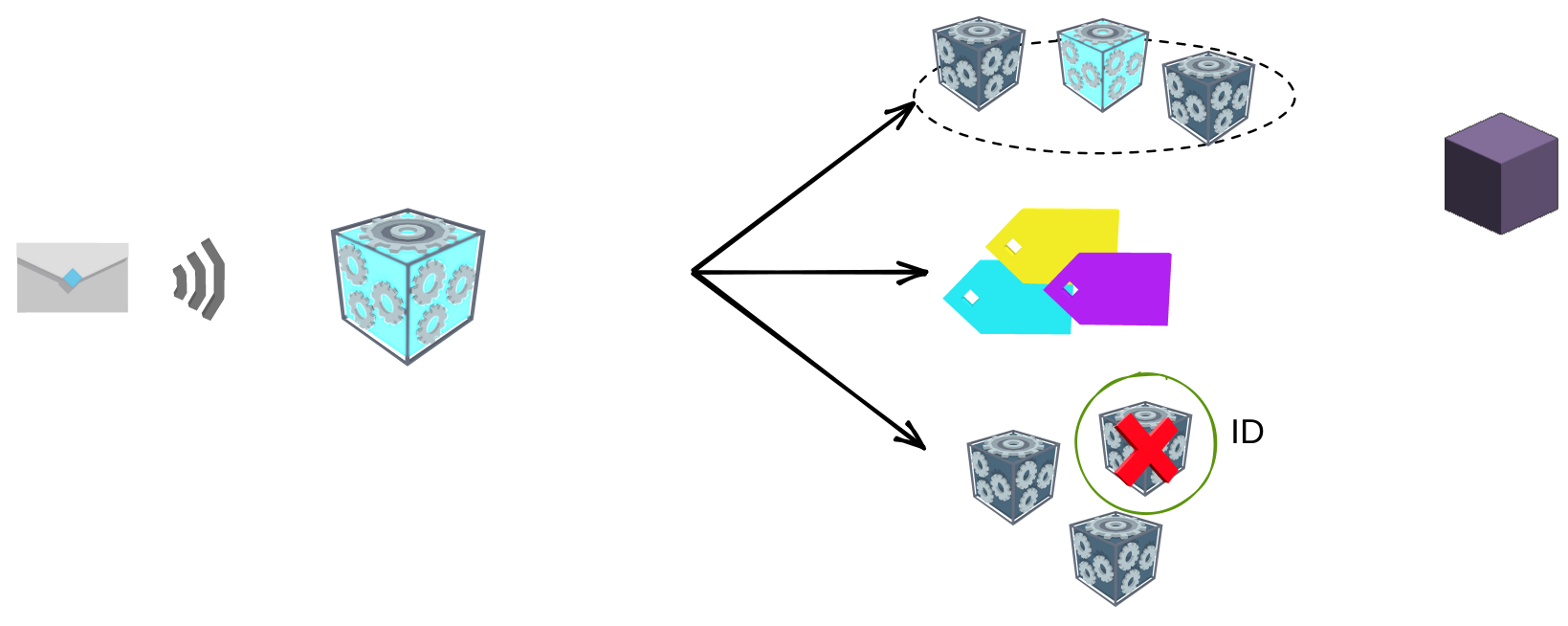
<table data-header-hidden><thead><tr><th width="278"></th><th></th></tr></thead><tbody><tr><td><p><strong>Inputs:</strong></p><p>Message received (or automatically on start)</p></td><td><p><strong>Outputs:</strong></p><p>Removes specified blocks or assets specified (no destroy animation)</p></td></tr></tbody></table>

<img src="https://content.gitbook.com/content/83PS3g9zpWmq73xzlwFn/blobs/dVXFRq1RZR6YJhHO4zeL/file.excalidraw.svg" alt="" class="gitbook-drawing">

## Parameters

| Options                                                                                            | Details                                                                                                                                                                                                                                                                                                                                                                                                                                                                                                                                                  |
| -------------------------------------------------------------------------------------------------- | -------------------------------------------------------------------------------------------------------------------------------------------------------------------------------------------------------------------------------------------------------------------------------------------------------------------------------------------------------------------------------------------------------------------------------------------------------------------------------------------------------------------------------------------------------- |
| ![](https://content.gitbook.com/content/83PS3g9zpWmq73xzlwFn/blobs/ZmqoWLQI8JfTz5Znxv0N/image.png) | **Visible** - Determines whether the Object is visible or invisible.                                                                                                                                                                                                                                                                                                                                                                                                                                                                                     |
| ![](https://content.gitbook.com/content/83PS3g9zpWmq73xzlwFn/blobs/TxlrObkMp4IV6vRzFS6O/image.png) | <p><strong>Destroy Area</strong> - Determines the area in which the specified blocks and/or assets should be destroyed.<br><br>This parameter is visualised with a <mark style="color:red;"><strong>red</strong></mark> cube Gizmo that adjusts as you enter new <mark style="color:red;"><strong>X</strong></mark>, <mark style="color:green;"><strong>Y</strong></mark>, and <mark style="color:blue;"><strong>Z</strong></mark> values.</p>                                                                                                           |
| ![](https://content.gitbook.com/content/83PS3g9zpWmq73xzlwFn/blobs/aOJRrZuRsIjyAHYgPqWr/image.png) | <p><strong>Activation Mode</strong> - Determines how the behaviour will be activated.<br><br><em><mark style="color:green;">OnStart</mark></em> - The behaviour will destroy the blocks/assets immediately when the game starts.<br><br><em><mark style="color:blue;">OnReceiveMessage</mark></em> - The behaviour will destroy the blocks/assets upon receiving a message. You may specify which message from a drop-down menu.</p>                                                                                                                     |
| ![](https://content.gitbook.com/content/83PS3g9zpWmq73xzlwFn/blobs/aZNSTLII3EYO8DQU1Njy/image.png) | <p><strong>Blocks Destruction</strong> - Allows you to choose what blocks to destroy, if any.<br><br><em><mark style="color:red;">Don't Destroy</mark></em> - The Void will not destroy any blocks upon activation.<br><br><em><mark style="color:blue;">DestroyAllExceptFromList</mark></em> - The Void will destroy all blocks in range except for the blocks added to your list (see below).<br><br><em><mark style="color:green;">OnlyDestroyFromList</mark></em> - The Void will destroy all blocks of the type added to your list (see below).</p> |
| ![](https://content.gitbook.com/content/83PS3g9zpWmq73xzlwFn/blobs/o4qL8MbfjJ0BPZ1meoFQ/image.png) | *<mark style="color:green;">**Blocks List**</mark>* - This list lets you add blocks that the Void should or should not destroy on activation (depending on which setting was used above).                                                                                                                                                                                                                                                                                                                                                                |
| ![](https://content.gitbook.com/content/83PS3g9zpWmq73xzlwFn/blobs/cODyKpcwAwtUDsazwkOQ/image.png) | <p><strong>Asset Destruction</strong> - Allows you to choose what assets to destroy, if any.<br><br><em><mark style="color:red;">Don't Destroy</mark></em> - The Void will not destroy any assets upon activation.<br><br><em><mark style="color:blue;">DestroyAllExceptFromList</mark></em> - The Void will destroy all assets in range except for the assets added to your list (see below).<br><br><em><mark style="color:green;">OnlyDestroyFromList</mark></em> - The Void will destroy all assets of the type added to your list (see below).</p>  |
| ![](https://content.gitbook.com/content/83PS3g9zpWmq73xzlwFn/blobs/8pDCaPnr5DTjEVwZIXXP/image.png) | *<mark style="color:green;">**Assets List**</mark>* - This list lets you add assets that the Void should or should not destroy on activation (depending on which setting was used above).                                                                                                                                                                                                                                                                                                                                                                |