> For the complete documentation index, see [llms.txt](https://docs.sandbox.game/en/llms.txt). Markdown versions of documentation pages are available by appending `.md` to page URLs; this page is available as [Markdown](https://docs.sandbox.game/en/creator/game-maker/docs/behaviours/movement/bird.md).
# Bird
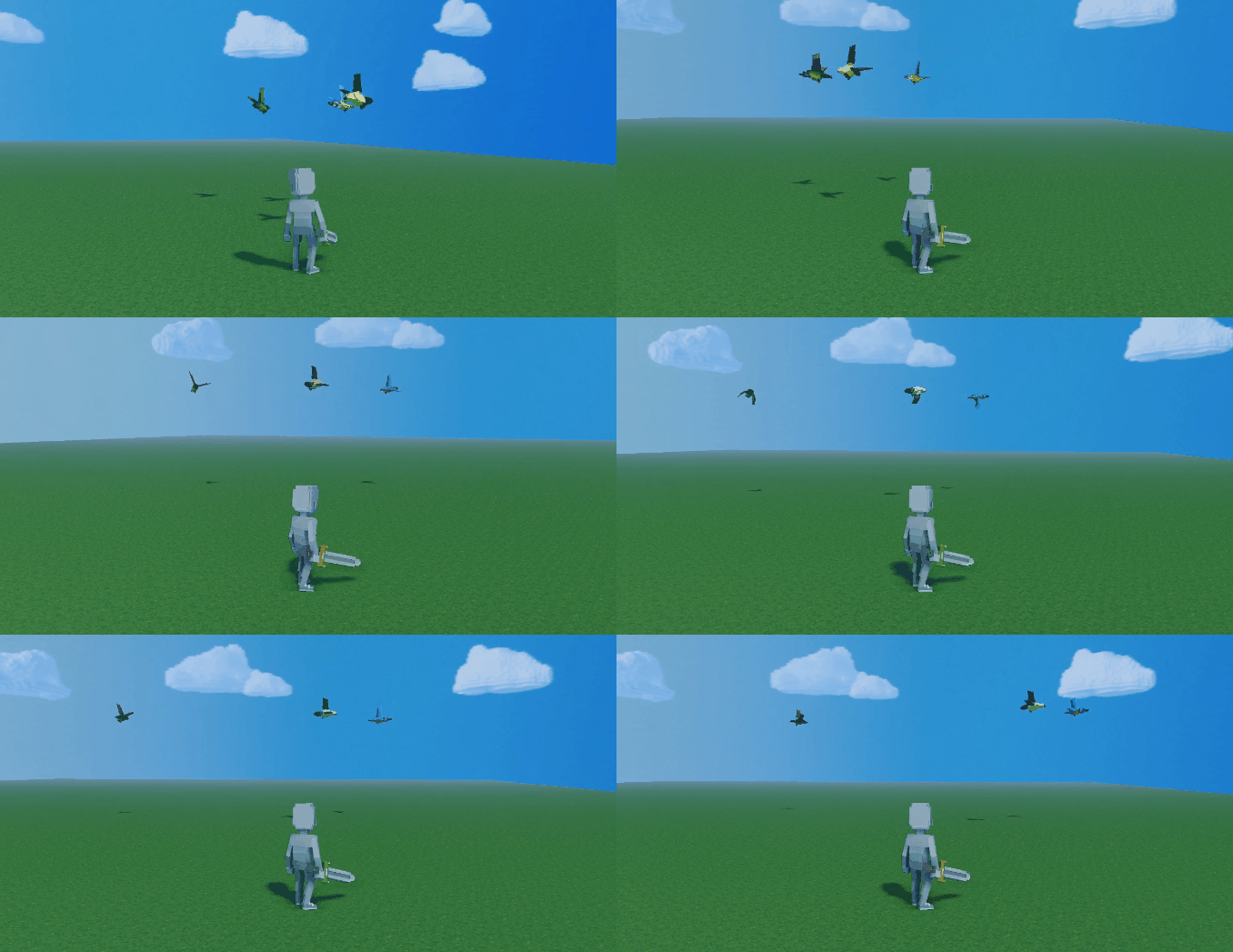
Move in a circular motion with potential randomisation.
{% hint style="success" %}
**COPY/PASTE PARAMETERS**
New in GM 0.11! Right click on a behaviour or component to copy. Then open an object, add the same behaviour or component, and right click it to paste identical parameter settings.
{% endhint %}
{% hint style="info" %}
[Build Singleplayer & Multiplayer Logic](/en/creator/game-maker/docs/build-singleplayer-and-multiplayer-logic.md) - about **\[SP]** or **\[MP]** behaviours or components.
{% endhint %}
{% hint style="warning" %}
An Object with Bird Behaviour has:
* No collisions with other objects
* Collisions with the player
* A 45 degree tilt toward the center of rotation (speed no longer changes the angle)
{% endhint %}
##  Bird \[MP]
* Define a zone for circular movement (object tilts)
* Add height and width ranges for randomised motion
## Common Uses
* Orbiting movement for birds flying, fish swimming, etc. (select animation to display)
* Create randomised motion during orbit when the maximum and minimum heights and/or widths for movement are not the same values.
* Apply to a Parent Object to control motion of Child Objects (will also be tilted 45 degrees)
## Communications
There are no direct communications with Bird Behaviour, but you can control it or interact with it using other logic.
## Movement
The Object orbits around the location where it is placed depending on the set parameters.
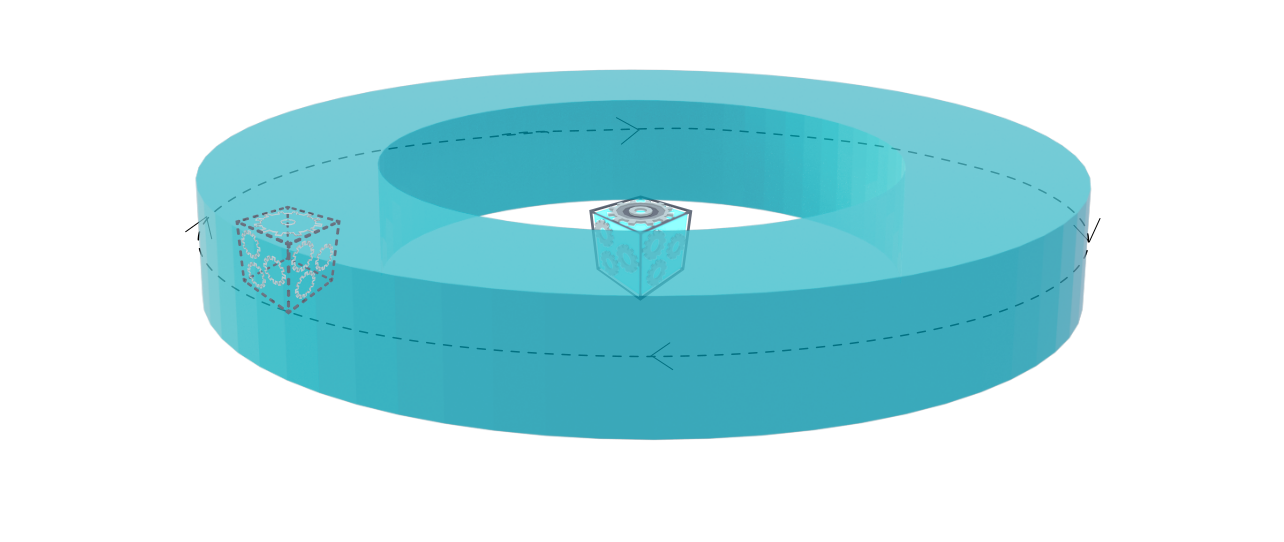
Set different maximum and minimum heights and widths to create a 2 or 3D range for a random path during orbit.
**Motion range varies based on parameters:**
## Parameters
| Options | Details |
| -------------------------------------------------------------------------------------------------- | ------------------------------------------------------------------------------------------------------------------------------------------------------------------------------------------------------------------------------------------------------------------------------------------------------------------------------------------- |
|  |
Flying Animation - select which of the Asset's animations will display during the flying movement.
NOTE Test to make sure the selected animation looks as expected while in motion. There is no parameter to adjust the angle of tilt or the speed of the animation with this behaviour.
|
|  | **Flying Speed** (slider) - set the speed the Object will move within the parameters set below. |
|  |
Flying Min. Width (slider) - set the minimum distance from an Object's pivot point where it will orbit during play mode. This parameter is visualised with a smaller blue circle Gizmo that adjusts as you move the slider or change the value.
Flying Max. Width (slider) - set the maximum distance from an Object's pivot point where it will orbit during play mode. This parameter is visualised with a larger blue circle Gizmo that adjusts as you move the slider or change the value.
|
|  | **Flying Max. Height** (slider) - set the maximum distance from an Object's position on the vertical Y axis where it will ascend to in orbit during play mode. |
|  | **Flying Min. Height** (slider) - set the minimum distance from an Object's position on the vertical Y axis where it will descend to in orbit during play mode. |
---
# Agent Instructions
This documentation is published with GitBook. GitBook is the documentation platform designed so that both humans and AI agents can read, navigate, and reason over technical content effectively. Learn more at gitbook.com.
## Querying This Documentation
If you need additional information that is not directly available in this page, you can query the documentation by asking a question.
Perform an HTTP GET request on the following URL with the `ask` and `goal` query parameters:
```
GET https://docs.sandbox.game/en/creator/game-maker/docs/behaviours/movement/bird.md?ask=&goal=
```
`ask` is the immediate question: it should be specific, self-contained, and written in natural language.
`goal` is what the user is ultimately trying to achieve, the reason they need the answer. Sharing it helps GitBook give you a better, more relevant answer. A goal is most helpful when it describes the outcome the user wants rather than restating the question. For example, with `ask=how do I create an API token`, a goal like `automate deployments from our CI pipeline` lets GitBook tailor the answer to that use case.
The response will contain a direct answer to the question and relevant excerpts and sources from the documentation.
Use this mechanism when the answer is not explicitly present in the current page, you need clarification or additional context, or you want to retrieve related documentation sections.
 ## Parameters
| Options | Details |
| -------------------------------------------------------------------------------------------------- | ------------------------------------------------------------------------------------------------------------------------------------------------------------------------------------------------------------------------------------------------------------------------------------------------------------------------------------------- |
|  |
## Parameters
| Options | Details |
| -------------------------------------------------------------------------------------------------- | ------------------------------------------------------------------------------------------------------------------------------------------------------------------------------------------------------------------------------------------------------------------------------------------------------------------------------------------- |
|  |