# Pickable

{% hint style="success" %}
**COPY/PASTE PARAMETERS**

New in GM 0.11! Right click on a behaviour or component to copy. Then open an object, add the same behaviour or component, and right click it to paste identical parameter settings.
{% endhint %}

<figure><img src="https://4251931498-files.gitbook.io/~/files/v0/b/gitbook-legacy-files/o/assets%2F-MO_j99BJEXK4zHqxgqS%2F-MOp-7ir3XnEbY6dzW8x%2F-MOp-WtUSFcceYJeNefT%2FPickable.gif?alt=media&#x26;token=81de309a-95ba-4954-a134-4ae6d54cebff" alt=""><figcaption></figcaption></figure>

{% hint style="info" %}
[Build Singleplayer & Multiplayer Logic](/en/creator/game-maker/docs/build-singleplayer-and-multiplayer-logic.md) - about <mark style="color:green;">**\[SP]**</mark> or <mark style="color:yellow;">**\[MP]**</mark> behaviours or components
{% endhint %}

## ![](/files/AontwzpwHqOiQLnc4hIt) Pickable <mark style="color:green;">\[SP]</mark> <mark style="color:yellow;">\[MP]</mark>

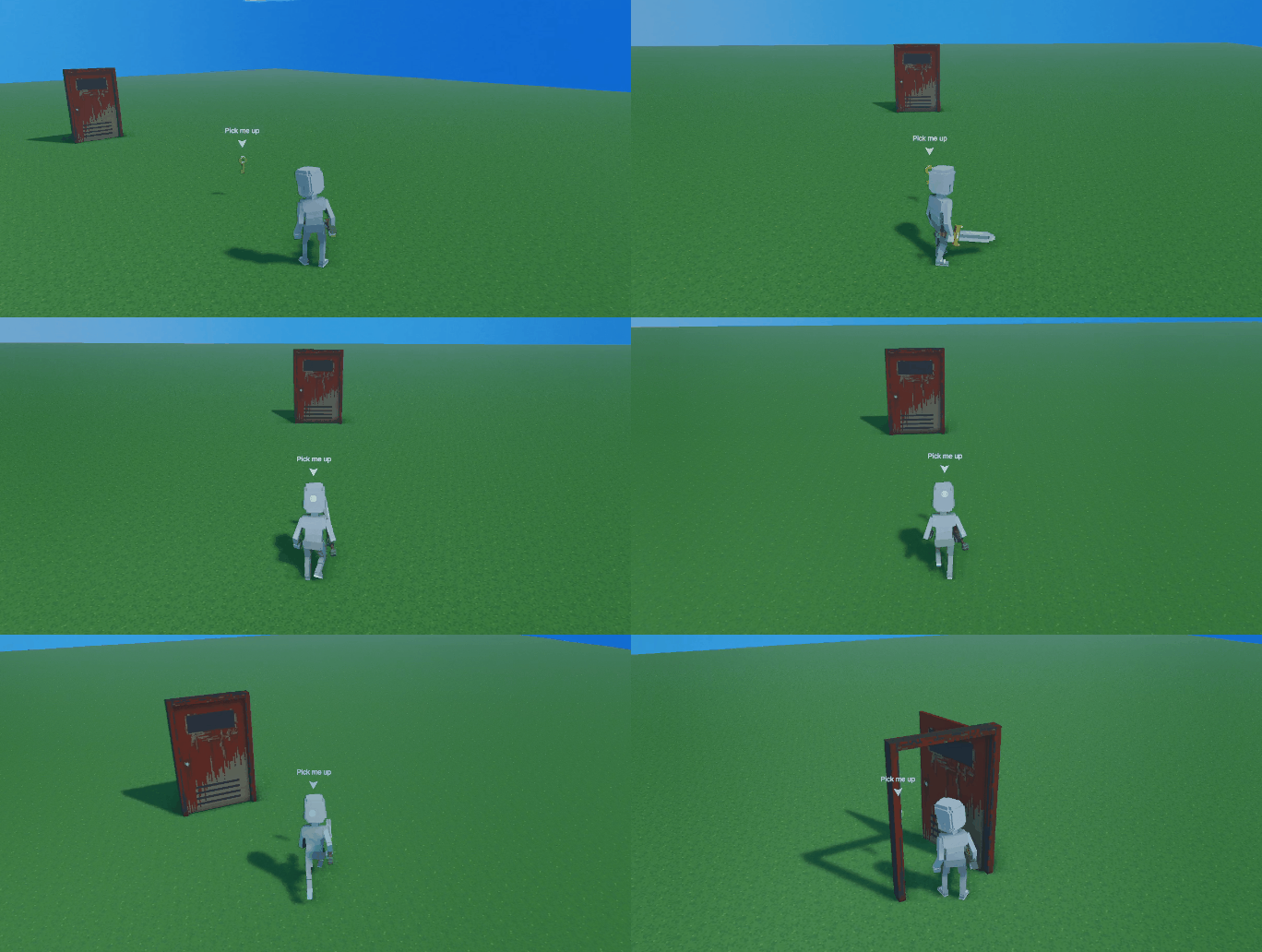
This component allows you to pick the asset and move it anywhere you want with your avatar. Take a key to the door to make it open or bring an object to a platform to open a secret passageway behind a bookcase.

## Common Uses

* Allow the player pick up an item and carry it to another location.
* Carry a key to a door to open it.
* Put the right piece of the puzzle in the right location to trigger events.
* Create a bomb that explodes when dropped and blasts in a small radius.
* Pick up a book or map to read it.
* Use a make a gun and carry it around and shoot it.

## Communications

<table data-header-hidden><thead><tr><th width="319"></th><th></th></tr></thead><tbody><tr><td><strong>Inputs:</strong> Message sent on Pick up</td><td><strong>Outputs:</strong> Message sent on drop</td></tr></tbody></table>

## Parameters

<table><thead><tr><th width="370.5">Options</th><th>Details</th></tr></thead><tbody><tr><td><img src="/files/NyerKkJuiiWtRFwTCAoi" alt=""></td><td><strong>Grab Offset</strong> - Defines the asset position once it gets picked up by the Avatar.</td></tr><tr><td><img src="/files/NM8bq0IJX4KJQ5HQkGLE" alt=""></td><td><strong>Camera Oriented</strong> - toggle on to make held object face forward from camera including tilting up and down (best for first person experiences).</td></tr><tr><td><img src="/files/0fk3veYRTcyL7zwl0EXf" alt=""></td><td><strong>Opacity On Picked</strong> (slider) - Defines the level of opacity of the picked up asset.</td></tr><tr><td><img src="/files/aToV6mQkrztccnny6qKb" alt=""></td><td><strong>Message On Picked</strong> - Defines the message to send when the actor is picked.</td></tr><tr><td><img src="/files/flYnTcZ2EbhUGyQdBy4d" alt=""></td><td><strong>Broadcast Type On Picked</strong> - Defines the broadcast method.<br><br><strong>Everyone In Range</strong> - Effect any asset listening for the message in range.<br><strong>Specific Tags In Range</strong> -  Effect any asset with a particular tag in range.</td></tr><tr><td><img src="/files/UEIUMU2mO5M7CDUVry3E" alt=""></td><td><em><mark style="color:green;"><strong>Broadcast Range On Picked</strong></mark></em> (slider) - set the distance the Message will reach<br><br>This parameter is visualised with a yellow circle Gizmo that adjusts as you change the value.</td></tr><tr><td><img src="/files/rwsN2o1fCAu6oYmAWzhc" alt=""></td><td><strong>Message On Dropped</strong> - Defines the message to send when the asset is dropped.</td></tr><tr><td><img src="/files/ivmdvaPuW0pnHQx9gqJw" alt=""></td><td><strong>Broadcast Type On Dropped</strong>- Defines the broadcast method.<br><br><strong>Everyone In Range</strong> - Effect any asset listening for the message in range.<br><strong>Specific Tags In Range</strong> -  Effect any asset with a particular tag in range.</td></tr><tr><td><img src="/files/97INyvFbz6kooHygpt30" alt=""></td><td><em><mark style="color:green;"><strong>Broadcast Range On Dropped</strong></mark></em> (slider) - set the distance the Message will reach<br><br>This parameter is visualised with a yellow circle Gizmo that adjusts as you change the value.</td></tr></tbody></table>


---

# Agent Instructions: Querying This Documentation

If you need additional information that is not directly available in this page, you can query the documentation dynamically by asking a question.

Perform an HTTP GET request on the current page URL with the `ask` query parameter:

```
GET https://docs.sandbox.game/en/creator/game-maker/docs/components/actions/pickable.md?ask=<question>
```

The question should be specific, self-contained, and written in natural language.
The response will contain a direct answer to the question and relevant excerpts and sources from the documentation.

Use this mechanism when the answer is not explicitly present in the current page, you need clarification or additional context, or you want to retrieve related documentation sections.







