> For the complete documentation index, see [llms.txt](https://docs.sandbox.game/en/llms.txt). Markdown versions of documentation pages are available by appending `.md` to page URLs; this page is available as [Markdown](https://docs.sandbox.game/en/creator/game-maker/docs/components/triggers/button.md).
# Button
This legacy behaviour was moved to a component in Game Maker 0.10 for to improve interconnection of logic. Documentation is being updated.
{% hint style="success" %}
**COPY/PASTE PARAMETERS**
New in GM 0.11! Right click on a behaviour or component to copy. Then open an object, add the same behaviour or component, and right click it to paste identical parameter settings.
{% endhint %}
| |
|---|
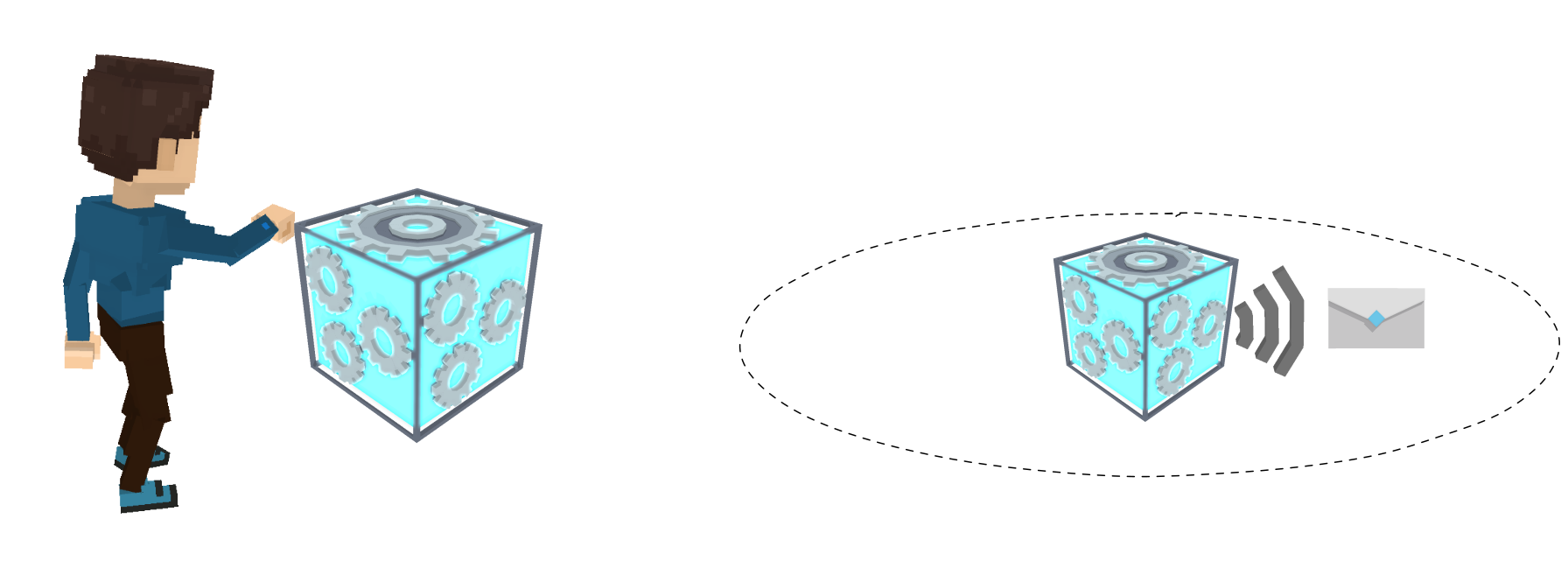
 | Send a message when a player interacts with an object. |
{% hint style="info" %}
[Build Singleplayer & Multiplayer Logic](/en/creator/game-maker/docs/build-singleplayer-and-multiplayer-logic.md) - about **\[SP]** or **\[MP]** behaviours or components.
{% endhint %}
{% hint style="success" %}
**USAGE TIP**\
**Button** component has a cooldown parameter, **Duration**, to prevent players from spamming logic triggers. Use this when you want logic to stay active, but not be triggered excessively at once.
{% endhint %}
##  Button \[SP] \[MP]
Interacting with this button will send a message to all assets within its broadcast range.
## Common Uses
* Send a message to another Object's Toggle Component to activate or deactivate its Behavior (e.g., Platform, Melee Enemy, etc) for a puzzle platformer
* Apply to Assets such as info panels and trigger the NFT Details Display Component, open doors from a distance, etc.
* Trigger lights and/or sound to turn on/off
* Reset logic on a Multiplayer Experience
## Communications
Button \[SP] \[MP]
Interacting with this button will send a message to all assets within its broadcast range.
## Common Uses
* Send a message to another Object's Toggle Component to activate or deactivate its Behavior (e.g., Platform, Melee Enemy, etc) for a puzzle platformer
* Apply to Assets such as info panels and trigger the NFT Details Display Component, open doors from a distance, etc.
* Trigger lights and/or sound to turn on/off
* Reset logic on a Multiplayer Experience
## Communications
| |
|---|
Inputs: Player Interaction (Press E) | Outputs: Send one message within a specified range |
 ## Parameters
| Options | Details |
| -------------------------------------------------------------------------------------------------- | --------------------------------------------------------------------------------------------------------------------------------------------------------------------------------------------------------------------------------- |
|  | **Message to Send** - set a Message to send when players press E and interact with this Object |
|  |
## Parameters
| Options | Details |
| -------------------------------------------------------------------------------------------------- | --------------------------------------------------------------------------------------------------------------------------------------------------------------------------------------------------------------------------------- |
|  | **Message to Send** - set a Message to send when players press E and interact with this Object |
|  | Broadcast Range - set the distance the Message will reach
This parameter is visualised with a yellow circle Gizmo that adjusts as you change the value.
|
---
# Agent Instructions
This documentation is published with GitBook. GitBook is the documentation platform designed so that both humans and AI agents can read, navigate, and reason over technical content effectively. Learn more at gitbook.com.
## Querying This Documentation
If you need additional information that is not directly available in this page, you can query the documentation by asking a question.
Perform an HTTP GET request on the following URL with the `ask` and `goal` query parameters:
```
GET https://docs.sandbox.game/en/creator/game-maker/docs/components/triggers/button.md?ask=&goal=
```
`ask` is the immediate question: it should be specific, self-contained, and written in natural language.
`goal` is what the user is ultimately trying to achieve, the reason they need the answer. Sharing it helps GitBook give you a better, more relevant answer. A goal is most helpful when it describes the outcome the user wants rather than restating the question. For example, with `ask=how do I create an API token`, a goal like `automate deployments from our CI pipeline` lets GitBook tailor the answer to that use case.
The response will contain a direct answer to the question and relevant excerpts and sources from the documentation.
Use this mechanism when the answer is not explicitly present in the current page, you need clarification or additional context, or you want to retrieve related documentation sections.