# Create Assets

### **Visit** :globe\_with\_meridians:[Languages](https://app.gitbook.com/s/61fllYo416R30LRxku4v/general/languages "mention") **for available documentation, software, and communities.**

## What is VoxEdit?

<figure><img src="https://331512196-files.gitbook.io/~/files/v0/b/gitbook-x-prod.appspot.com/o/spaces%2F83PS3g9zpWmq73xzlwFn%2Fuploads%2FdGjbcshg1ehyMszN1xkK%2FVE%20create%20amimated%20asset%20opt.webp?alt=media&#x26;token=7cb84e3b-c404-4cfe-85e4-0e902cb7492e" alt=""><figcaption><p>Build models, right them together, and create multiple animations in VoxEdit</p></figcaption></figure>

VoxEdit is a 3D modelling and animation program designed for creating **terrain blocks** and **voxel-based assets, which can be minted as NFTs for use in The Sandbox Game**.

VoxEdit is **free to use**, whether your project is personal, educational, or commercial. It consists of three creative modules and includes templates to speed up your creative workflow.

In one unique, intuitive software, you can **build models, rig them together, and add multiple animations**. VoxEdit creations are the interactive elements that make up an **Experience** [**created in Game Maker**](https://docs.sandbox.game/en/creator/game-maker/create-experiences).

{% hint style="info" %}
The recent VoxEdit update includes great quality of life improvements for your creative workflows.
{% endhint %}

Whether you're a beginner or you have skills using similar software, we have resources to get you started.

## What Can I Make?

Along with making custom terrain blocks, there are so many possibilities for creating elements with VoxEdit. Create small or large entities, fun and useful equipment for players, art, structures, and more! View the examples below or browse [**The Sandbox Marketplace**](https://www.sandbox.game/en/shop/) for more.

{% tabs %}
{% tab title="Assets" %}

<div><figure><img src="https://content.gitbook.com/content/83PS3g9zpWmq73xzlwFn/blobs/VURMDExFf14fxeLkLn5y/water%20scimitar%20-%20Elements.png" alt=""><figcaption><p>Weapons</p></figcaption></figure> <figure><img src="https://content.gitbook.com/content/83PS3g9zpWmq73xzlwFn/blobs/8kDL5aaDE7zNSG6FPCnG/kawigan%20guardian%20-%20Verified%20Labs%20LLC.png" alt=""><figcaption><p>Shields</p></figcaption></figure> <figure><img src="https://content.gitbook.com/content/83PS3g9zpWmq73xzlwFn/blobs/P5214q0HRWUI3HhmxfvD/scuba%20helmet%20-%20ZeroGames.png" alt=""><figcaption><p>Wearable Equipment</p></figcaption></figure></div>

<div><figure><img src="https://content.gitbook.com/content/83PS3g9zpWmq73xzlwFn/blobs/9zopeDldZyBgsH4yHhs3/fashion%20mogul%20man%20-%20Sirpantsalot.png" alt=""><figcaption><p>Non-Player Characters (NPCs)</p></figcaption></figure> <figure><img src="https://content.gitbook.com/content/83PS3g9zpWmq73xzlwFn/blobs/lfCMORPw0gJ5LCReZMYQ/rabbid%20chinese%20azure%20dragon.png" alt=""><figcaption><p>Creatures</p></figcaption></figure> <figure><img src="https://content.gitbook.com/content/83PS3g9zpWmq73xzlwFn/blobs/24A2zn9Ljr26QKFl5II3/umbrella%20glow-shroom%20TSB.png" alt=""><figcaption><p>Environmental</p></figcaption></figure></div>

<div><figure><img src="https://content.gitbook.com/content/83PS3g9zpWmq73xzlwFn/blobs/ngRfb2hdc0pXTdM5de3K/shrine%20hut%20TSB.png" alt=""><figcaption><p>Buildings</p></figcaption></figure> <figure><img src="https://content.gitbook.com/content/83PS3g9zpWmq73xzlwFn/blobs/NjXJ7oMrnMP90I09ggrv/giant%20trebuchet%20TSB.png" alt=""><figcaption><p>Large Decor</p></figcaption></figure> <figure><img src="https://content.gitbook.com/content/83PS3g9zpWmq73xzlwFn/blobs/fbn2AUZoYrwXYFm0mhTC/scientist%20holospace%20TSB.png" alt=""><figcaption><p>Small Decor</p></figcaption></figure></div>

<div><figure><img src="https://content.gitbook.com/content/83PS3g9zpWmq73xzlwFn/blobs/0OW51CVxJlgpu9eopSYf/old%20sky%20train%20TSB.png" alt=""><figcaption><p>Transportation</p></figcaption></figure> <figure><img src="https://content.gitbook.com/content/83PS3g9zpWmq73xzlwFn/blobs/ret2442OHjyPt2g7RKpk/L&#x27;Eiffel%20TSB.png" alt=""><figcaption><p>Landmarks</p></figcaption></figure> <figure><img src="https://content.gitbook.com/content/83PS3g9zpWmq73xzlwFn/blobs/KeUe4WjpQnNdjS27uhSj/archer%20statue%20TSB.png" alt=""><figcaption><p>2D and 3D Art</p></figcaption></figure></div>
{% endtab %}

{% tab title="Blocks" %}

<figure><img src="https://331512196-files.gitbook.io/~/files/v0/b/gitbook-x-prod.appspot.com/o/spaces%2F83PS3g9zpWmq73xzlwFn%2Fuploads%2FDiWpbfU4XRD5nUsU4BN4%2Fblocks%20uses%20labeled%20opt.webp?alt=media&#x26;token=77fb981e-e4f7-454b-874a-3e9afc3a32da" alt=""><figcaption></figcaption></figure>
{% endtab %}
{% endtabs %}

## Download, Install & Login to VoxEdit <a href="#voxedit-setup" id="voxedit-setup"></a>

{% tabs %}
{% tab title="Download" %}

### Download VoxEdit <a href="#download-voxedit" id="download-voxedit"></a>

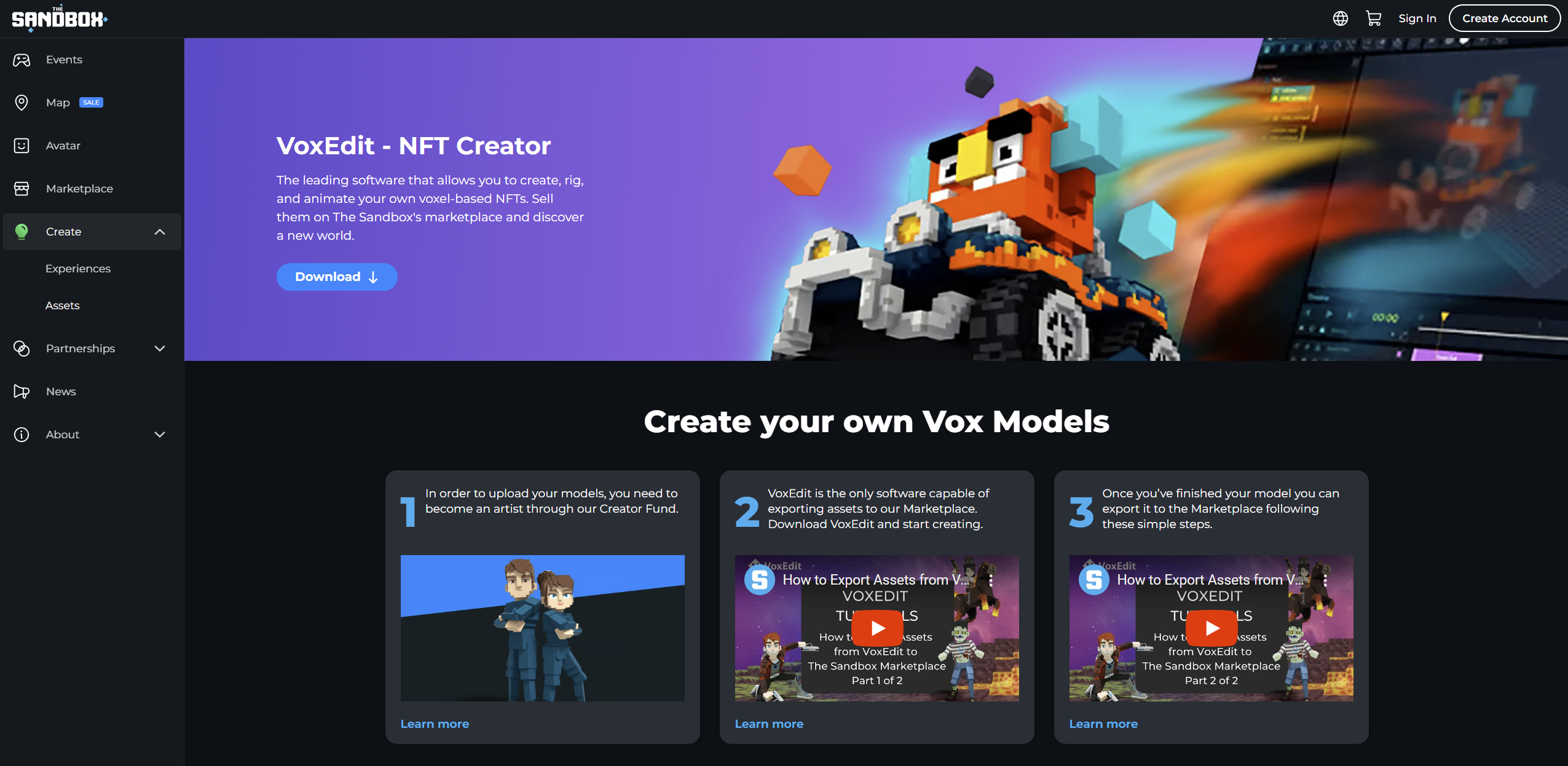
<figure><img src="https://content.gitbook.com/content/83PS3g9zpWmq73xzlwFn/blobs/cF62ubkQyPJTfarX92sb/image.png" alt="" width="563"><figcaption><p>Sandbox Website: VoxEdit</p></figcaption></figure>

1. ​[**Download from the VoxEdit page**](https://www.sandbox.game/en/create/vox-edit/) on [**The Sandbox website**](https://www.sandbox.game/en/), found in the "Create" tab.
2. Click the "Download Voxedit".
3. Choose Windows, MacOS Silicon or MacOS Intel.

You must have a 64-bit system to use VoxEdit. It is also recommended to update your GPU drivers, especially if you have an AMD card.
{% endtab %}

{% tab title="Install" %}

### Install VoxEdit

#### ​🪟Windows Version <a href="#windows-version" id="windows-version"></a>

Simply unzip the folder and place the program where you want it. You can run the install.bat file to add an icon to the save files. You will likely get warnings from Windows Security because it contains Java elements currently, to which you can click "More info" and "Run anyway". It is safe to add VoxEdit as an exception in your antivirus software.

#### ​🍎Mac OS Version <a href="#mac-os-version" id="mac-os-version"></a>

Right-Click on the downloaded file, select "Open" and "Open" again. This should start the installation. Apple has become stricter on third-party apps. You may need to open the security settings in system preferences and give permission for the program to run.

{% hint style="warning" %}
Currently, VoxEdit does not work on MacOS Ventura, but our team is working on a solution.
{% endhint %}
{% endtab %}

{% tab title="Login" %}

### Login to VoxEdit

You'll use the same username and secure password that you created on your Sandbox account as the login for VoxEdit, Game Maker, and the Game Client.&#x20;

VoxEdit allows you to create without logging in.&#x20;

However, if you log in you'll be able to [upload-assets-to-workspaces](https://docs.sandbox.game/en/creator/voxedit/upload-assets-to-workspaces "mention") on your account at The Sandbox. This step makes assets available in your Game Maker library so you can build an Experience or prepare assets for minting on the [Marketplace](https://app.gitbook.com/s/61fllYo416R30LRxku4v/general/marketplace "mention").

If you haven't created an account yet, start here:

{% content-ref url="<https://app.gitbook.com/s/61fllYo416R30LRxku4v/accounts/manage/create>" %}
[Create an Account](https://app.gitbook.com/s/61fllYo416R30LRxku4v/accounts/manage/create)
{% endcontent-ref %}
{% endtab %}
{% endtabs %}

## Start Creating

Try this sequence of hands-on activities designed to help you learn Game Maker fast!

{% content-ref url="beginners" %}
[beginners](https://docs.sandbox.game/en/creator/voxedit/beginners)
{% endcontent-ref %}

## Resources

{% content-ref url="../basics" %}
[basics](https://docs.sandbox.game/en/creator/basics)
{% endcontent-ref %}

<table data-card-size="large" data-view="cards"><thead><tr><th data-type="content-ref"></th></tr></thead><tbody><tr><td><a href="../basics/faqs-assets">faqs-assets</a></td></tr><tr><td><a href="faqs-voxedit">faqs-voxedit</a></td></tr></tbody></table>

<table data-card-size="large" data-view="cards"><thead><tr><th data-card-target data-type="content-ref"></th><th></th></tr></thead><tbody><tr><td><a href="docs">docs</a></td><td>Find comprehensive details on VoxEdit</td></tr><tr><td><a href="docs/ve-guidelines">ve-guidelines</a></td><td>Boost performance with best practices</td></tr><tr><td><a href="creative-guides/asset-guide">asset-guide</a></td><td>Find recommendations by asset type</td></tr><tr><td><a href="creative-guides/art-techniques">art-techniques</a></td><td>Improve your asset's 3D &#x26; visual quality</td></tr></tbody></table>

## Voxel Art Contests

Learn how to earn SAND for your creations in VoxEdit Contests.

{% content-ref url="../creators-program/voxedit-contests" %}
[voxedit-contests](https://docs.sandbox.game/en/creator/creators-program/voxedit-contests)
{% endcontent-ref %}

## Community

### [Socials](https://app.gitbook.com/s/61fllYo416R30LRxku4v/general/socials-news-blogs)

![](https://content.gitbook.com/content/83PS3g9zpWmq73xzlwFn/blobs/cKqJHkH8XJVUBW1p5Nt8/discord%20socials.png) [VoxEdit Creations Channel ](https://discord.gg/thesandboxgame)        |    <img src="https://content.gitbook.com/content/83PS3g9zpWmq73xzlwFn/blobs/VHWcY0IQSERvMVP7GBho/logo-white.png" alt="" data-size="line"> [#VoxEditWeekly](https://twitter.com/hashtag/VoxEditWeekly?src=hashtag_click)

![](https://content.gitbook.com/content/83PS3g9zpWmq73xzlwFn/blobs/cKqJHkH8XJVUBW1p5Nt8/discord%20socials.png) [Game Maker Teasers channel](https://discord.gg/thesandboxgame)    |    <img src="https://content.gitbook.com/content/83PS3g9zpWmq73xzlwFn/blobs/VHWcY0IQSERvMVP7GBho/logo-white.png" alt="" data-size="line"> [#ScreenshotSaturday](https://twitter.com/hashtag/ScreenshotSaturday?src=hashtag_click)    |    <img src="https://content.gitbook.com/content/83PS3g9zpWmq73xzlwFn/blobs/VHWcY0IQSERvMVP7GBho/logo-white.png" alt="" data-size="line"> [#tsbgamejam](https://twitter.com/hashtag/tsbgamejam?src=hashtag_click)

### Livestreams

Follow along and ask questions during our Livestreams, available on Twitch. Subscribe to receive notifications for when we go live!

{% embed url="<https://www.twitch.tv/thesandboxgame>" %}

### Discord

<table data-card-size="large" data-view="cards"><thead><tr><th></th><th data-hidden data-card-target data-type="content-ref"></th></tr></thead><tbody><tr><td><p><a href="https://discord.gg/thesandboxgame">Join Discord</a></p><ul><li>Ask for help (English) in the VoxEdit  or Game Maker Community Discussions</li><li>File a ticket for a technical issue in the VoxEdit or Game Maker Support Channels</li><li>Find channels in other languages</li></ul></td><td><a href="https://discordapp.com/invite/vAe4zvY">https://discordapp.com/invite/vAe4zvY</a></td></tr><tr><td><p><span data-gb-custom-inline data-tag="emoji" data-code="1f5e3">🗣️</span> <a href="https://app.gitbook.com/s/61fllYo416R30LRxku4v/general/discord-community">Discord Community</a> Guide</p><ul><li>How to join and claim roles</li><li>Basics to navigate Discord</li><li>Resources to stay safe on Discord and report issues</li></ul></td><td><a href="broken-reference">Broken link</a></td></tr></tbody></table>


---

# Agent Instructions: Querying This Documentation

If you need additional information that is not directly available in this page, you can query the documentation dynamically by asking a question.

Perform an HTTP GET request on the current page URL with the `ask` query parameter:

```
GET https://docs.sandbox.game/en/creator/voxedit/create-assets.md?ask=<question>
```

The question should be specific, self-contained, and written in natural language.
The response will contain a direct answer to the question and relevant excerpts and sources from the documentation.

Use this mechanism when the answer is not explicitly present in the current page, you need clarification or additional context, or you want to retrieve related documentation sections.