# Basic Building: No Entry

## Types

### Simple Entity - Modeler

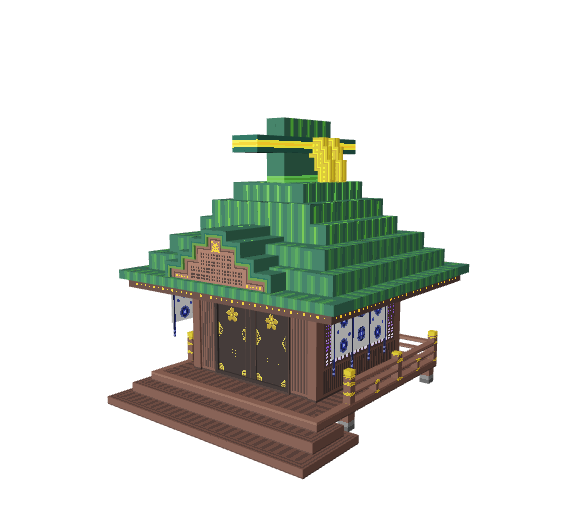
#### 🟢 Easy

<table data-header-hidden><thead><tr><th width="465"></th><th></th></tr></thead><tbody><tr><td><p>ABOUT</p><ul><li>Filled interior</li><li>Voxels on one Model's X, Y, and Z axes</li></ul><p>PROS</p><ul><li>Low impact on game performance</li><li>Helps players focus on quests</li></ul><p>CONS</p><ul><li>Decoration only</li><li>May appear blocky if made without much 3D depth or texturing</li></ul></td><td><img src="/files/5k1JOXsKCET6lSqZ3yeR" alt="Hall of Worship - East Haiden by choco" data-size="original"><br><a href="https://www.sandbox.game/en/assets/hall-of-worship-east-haiden/d4b9c849-df13-42bc-be31-ee61c326df52/">Hall of Worship - East Haiden <br>by choco</a></td></tr></tbody></table>

### Compound Entity - Animator

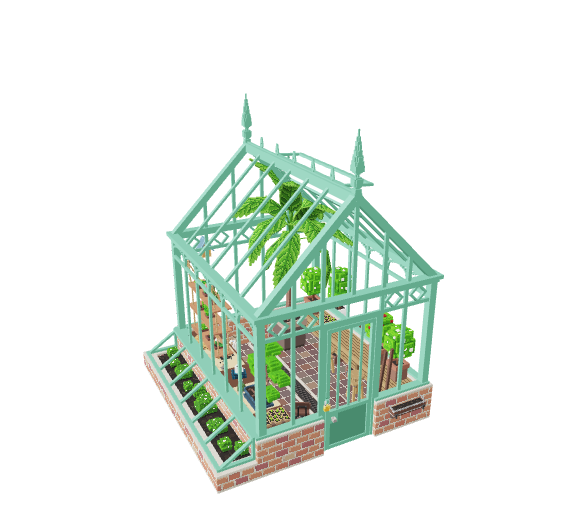
#### 🟡 Medium

<table data-header-hidden><thead><tr><th width="462"></th><th></th></tr></thead><tbody><tr><td><p>ABOUT</p><ul><li>Closed or open view of the interior</li><li>Models positioned and rotated to create an angled roof or other details</li></ul><p>PROS</p><ul><li>Visually attractive with smooth angled lines</li></ul><p>CONS</p><ul><li><a href="/pages/vKHOFTEVJMFhqMUCNiuC">Optimisation</a> is important since structure assets may be used frequently in one Experience by level designers</li><li>Details may distract players from quests, especially if there's an open view of the interior </li></ul></td><td><img src="/files/gOwN1ooWF9sWLdFLM1Wc" alt="Greenhouse by KiwiAndCoffee" data-size="original"><br><a href="https://www.sandbox.game/en/assets/greenhouse/8fe33626-0748-41fc-91ad-c3fd252e71b1/">Greenhouse <br>by KiwiAndCoffee</a></td></tr></tbody></table>

## Notes

Add 2D texture and some 3D depth, but keep in mind this type of asset is usually lower priority in the [**visual hierarchy**](/en/creator/game-maker/creative-guides/experience-design-techniques/art-design/experience-art-concept.md#visual-hierarchy) of an Experience unless it is important to the story.

## Recommended Workflow

To optimise, you must track face count even on a simple entity. You must also track node count on a compound entity. This is why it's best to start your project in the Animator, which provides this information in the top left of the Viewport.

1. Create a new project in the Animator and add a Control node in the skeleton on the left.
2. Create a new VXM in the Library and open it in the Modeler.
3. **If you plan to make a simple entity**, modify the collision boundary, create your asset, adjust the pivot point, and trim the volume. Then save and exit the Model, drag and drop it into the node you created, and check face count. Make adjustments as needed for the lowest face count possible, not to exceed 5,000 faces.
4. **If you plan to make a compound entity**, complete step 3 to make a 3D "sketch" of your design (angled lines will appear blocky). You can select voxels and choose "Save Selected Voxels" from the Edit menu to create new Models or create new ones in the Library. Trim, adjust the pivot point, and position Models you create into a skeleton of nodes in the Animator. Keep the total faces below 5,000 and nodes below 175.

{% hint style="success" %}
**QUALITY & PERFORMANCE**

Follow [Quality Guidelines](/en/creator/voxedit/docs/ve-guidelines.md) to make the best version of your Asset.
{% endhint %}


---

# Agent Instructions: Querying This Documentation

If you need additional information that is not directly available in this page, you can query the documentation dynamically by asking a question.

Perform an HTTP GET request on the current page URL with the `ask` query parameter:

```
GET https://docs.sandbox.game/en/creator/voxedit/creative-guides/asset-guide/structures-and-landmarks/basic-building-no-entry.md?ask=<question>
```

The question should be specific, self-contained, and written in natural language.
The response will contain a direct answer to the question and relevant excerpts and sources from the documentation.

Use this mechanism when the answer is not explicitly present in the current page, you need clarification or additional context, or you want to retrieve related documentation sections.