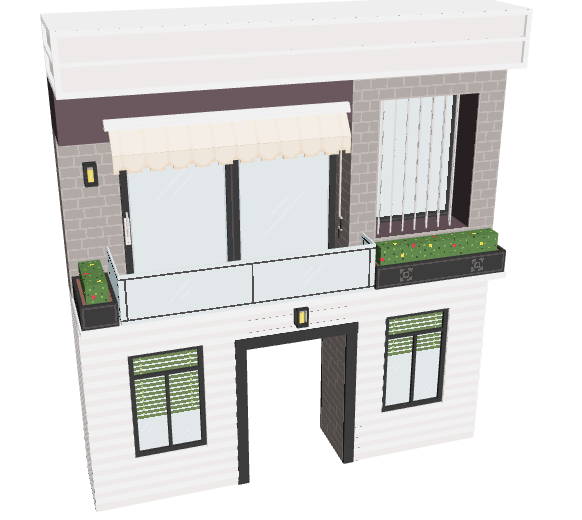
# Building Facade

## Types

### Compound Asset - Animator

#### 🟡 Medium

<table data-header-hidden><thead><tr><th width="445"></th><th></th></tr></thead><tbody><tr><td><p>ABOUT</p><ul><li>Modular Asset with an entry point for players</li></ul><p>PROS</p><ul><li>Easy to use with blocks for any size building</li></ul><p>CONS</p><ul><li>Most artists only make the front (no blocks or other walls to match)</li><li>Can NOT be animated since it would prevent player entry</li></ul></td><td><img src="/files/JFI9Egksb8wBvpWgWtMV" alt=""><br><a href="https://www.sandbox.game/en/assets/modern-short-facade/6a20b1b5-79d8-4392-b8df-57bb0131837c/">Modern Short Facade <br>by s7efavoxel</a></td></tr></tbody></table>

## Notes

Consider making matching walls for level designers to use on the other faces of the building or creating a matching block.

Do not add animations to an Asset that players are meant to enter. It will create a collision boundary around the whole Asset.

The most essential part of the design is the opening for the player to pass through. To do this, you must break down a wall into smaller sections and leave an opening without a Model that is the same scale as a door (single or double). Do not include a door in your design. The level designer will add a door and logic so players can get through the opening.

## Recommended Workflow

1. Create a new project in the Animator and add a Control node in the skeleton on the left.
2. Create a new VXM in the Library and open it in the Modeler.
3. Create a 3D "sketch" of your Asset as this Model. Modify the collision boundary, create your asset, adjust the pivot point, and trim the volume. Save and exit the Model, then drag and drop it into the node you created.
4. Use the "sketch" Model to guide the shape of your rig. You can select voxels and choose "Save Selected Voxels" from the Edit menu to create new Models or create new ones in the Library. Trim, adjust the pivot point, and position Models you create into a skeleton of nodes in the Animator. Keep the total faces below 5,000 and nodes below 175.

{% hint style="success" %}
**QUALITY & PERFORMANCE**

Follow [Quality Guidelines](/en/creator/voxedit/docs/ve-guidelines.md) to make the best version of your Asset.
{% endhint %}


---

# Agent Instructions: Querying This Documentation

If you need additional information that is not directly available in this page, you can query the documentation dynamically by asking a question.

Perform an HTTP GET request on the current page URL with the `ask` query parameter:

```
GET https://docs.sandbox.game/en/creator/voxedit/creative-guides/asset-guide/structures-and-landmarks/building-facade.md?ask=<question>
```

The question should be specific, self-contained, and written in natural language.
The response will contain a direct answer to the question and relevant excerpts and sources from the documentation.

Use this mechanism when the answer is not explicitly present in the current page, you need clarification or additional context, or you want to retrieve related documentation sections.