# Landmark

## Types

### Single Asset

#### 🟡 Medium to 🔴 Advanced

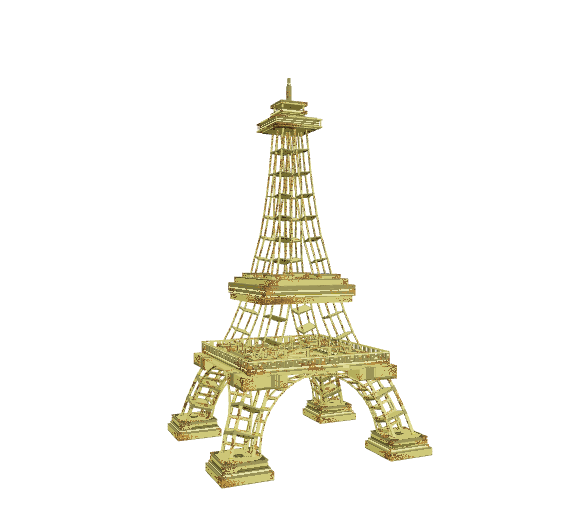
<table><thead><tr><th width="468"></th><th></th></tr></thead><tbody><tr><td><p>ABOUT</p><ul><li>Depending on design, it may have only one collision box and limit player interaction</li></ul><p>PROS</p><ul><li>Height draws players to explore areas or helps them find quests</li><li>Makes an experience memorable as a special detail that adds character</li><li>Faster to create than multi Asset landmarks</li></ul><p>CONS</p><ul><li>Often is for decoration only, taking up a large amount of space</li></ul></td><td><img src="https://content.gitbook.com/content/83PS3g9zpWmq73xzlwFn/blobs/nWjiw8aBuMW48jpCUoZH/image.png" alt=""><br><a href="https://www.sandbox.game/en/assets/l&#x27;eiffel/c5c37b45-1a65-4b5d-9832-001ac2b73588/">L'Eiffel <br>by SandstormMeet</a></td></tr></tbody></table>

### Multi Asset

#### 🟡 Medium to 🔴 Advanced

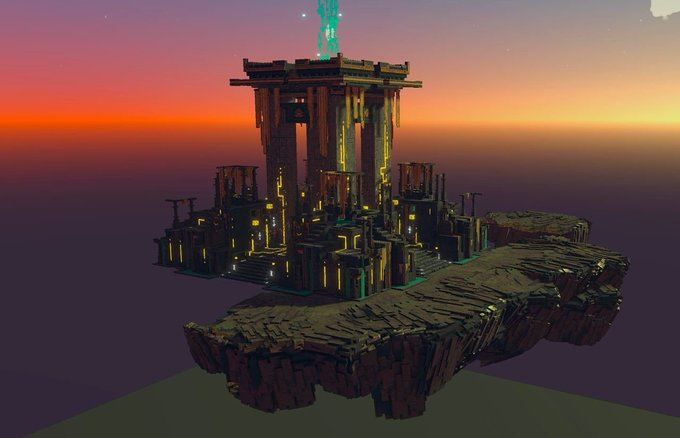
<table><thead><tr><th width="463"></th><th></th></tr></thead><tbody><tr><td><p>ABOUT</p><ul><li>Flexibility to assemble animated and unanimated Assets for an interactive design</li><li>Exceed the size limitations of single Assets</li></ul><p>PROS</p><ul><li>Makes an Experience feel epic since it's a unique kind of structure to explore and view</li><li>Can be used as an essential part of an Experience's story, with multiple animations possible per Asset (with or without motion)</li><li>Flexible uses of the component parts to create other variations of the landmark (may use any Model multiple times in one LAND)</li></ul><p>CONS</p><ul><li><a href="../../art-techniques/3d-design/optimize-with-texture">Optimisation</a> is important since a special landmark may have a lot more details to include in the design</li></ul></td><td><img src="https://content.gitbook.com/content/83PS3g9zpWmq73xzlwFn/blobs/A3TlKqxmJeeXMQF3VzhT/image.png" alt=""><br><a href="https://sandrush.medium.com/shrine-of-truth-an-epic-build-for-the-metaverse-dev-blog-99111605577d">The Shrine of Truth, a 7 piece landmark <br>by Sand Rush and Light Trail Adventures</a></td></tr></tbody></table>

## Notes

For Multi Asset landmarks, it's recommended to use the same colour palette and make sure the designs are cohesive. Test to ensure the pivot points of all Assets are well placed for a level designer to easily assemble the landmark.

Keep in mind that this type of asset is usually higher priority in the visual hierarchy of an Experience used as a focal point. Add more details since players will take more time to admire it.

## Recommended Workflow

Determine if the design will include one or multiple Assets. Break down the idea into parts based on what functionality is needed and how it can be reused. Create a new project in the Animator and add a Control node in the skeleton on the left. For each Asset in the design, follow the workflow below:

1. Create a new VXM in the Library and open it in the Modeler.
2. Create a 3D "sketch" of your Asset as this Model. Modify the collision boundary, create your asset, adjust the pivot point, and trim the volume. Save and exit the Model, then drag and drop it into the node you created.
3. Use the "sketch" Model to guide the shape of your rig. You can select voxels and choose "Save Selected Voxels" from the Edit menu to create new Models or create new ones in the Library. Trim, adjust the pivot point, and position Models you create into a skeleton of nodes in the Animator. Keep the total faces below 5,000 and nodes below 175.
4. You can create multiple animations for your Asset. Depending on the details you've added, you will want to pose the models you've created in different ways and make any necessary adjustments to their shape to fit the animation plans you have in mind.
5. Once all models are in position, create motion keyframes for each animation you want built into your Asset. Keep in mind that shorter animations are best for performance during gameplay, but longer ones are possible for special uses.

{% hint style="success" %}
**QUALITY & PERFORMANCE**

Follow [ve-guidelines](https://docs.sandbox.game/en/creator/voxedit/docs/ve-guidelines "mention") to make the best version of your Asset.
{% endhint %}


---

# Agent Instructions: Querying This Documentation

If you need additional information that is not directly available in this page, you can query the documentation dynamically by asking a question.

Perform an HTTP GET request on the current page URL with the `ask` query parameter:

```
GET https://docs.sandbox.game/en/creator/voxedit/creative-guides/asset-guide/structures-and-landmarks/landmark.md?ask=<question>
```

The question should be specific, self-contained, and written in natural language.
The response will contain a direct answer to the question and relevant excerpts and sources from the documentation.

Use this mechanism when the answer is not explicitly present in the current page, you need clarification or additional context, or you want to retrieve related documentation sections.