# Hunger(ハンガー)
##  Game Rules Preset Available
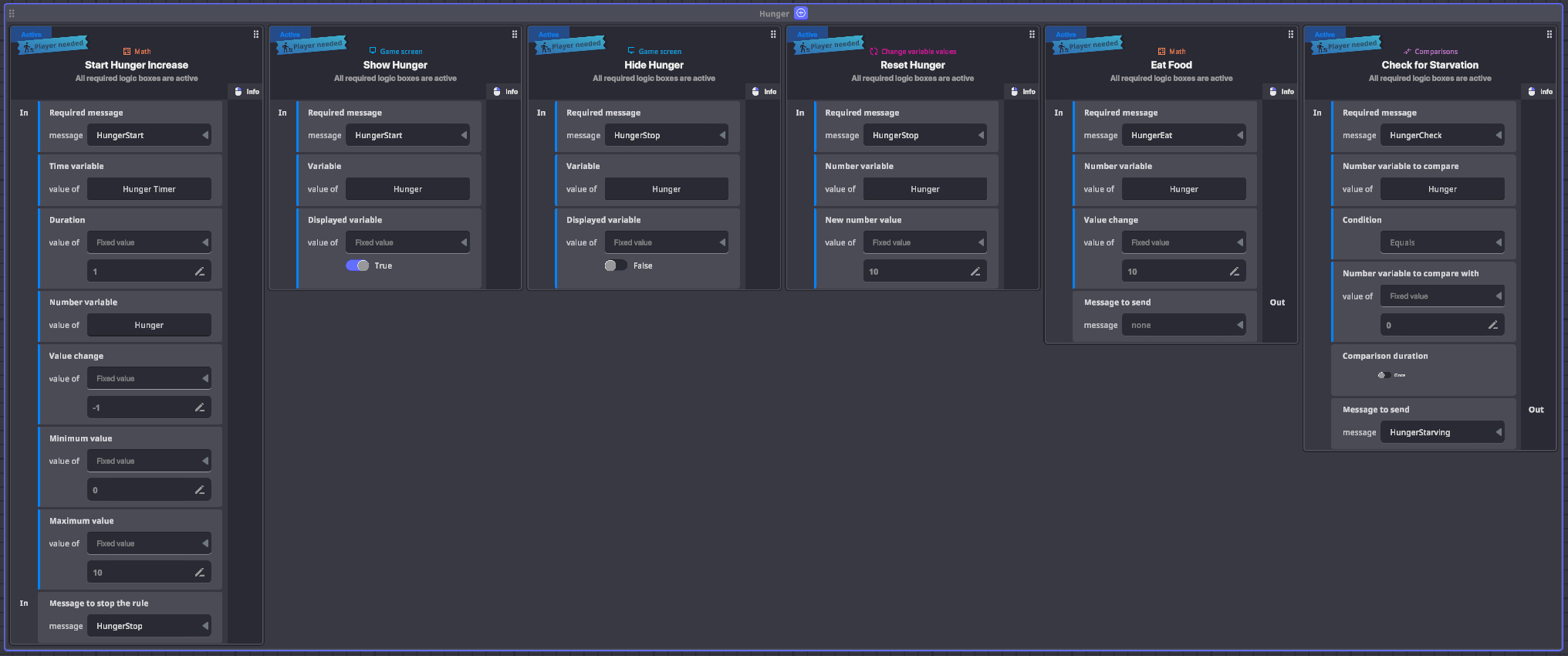
Hunger introduces a new player stat, that is useful for survival games. The stat will continously decrease and can be increased by performing interactions, like collecting an item.
{% hint style="warning" %}
**APPLYING PRESETS TO YOUR EXPERIENCE LOGIC**
Presets will only add rules, variables and messages in and out. To create a fully working game mechanic you also need to add assets with behaviours and components to communicate with the Preset.
[See an example of applying a Ruleset for a **Collect Points** mechanic.](https://docs.sandbox.game/jp/creators/game-maker/creative-guide/game-rule-guide/collect-pointspointome)
{% endhint %}
### Add a Preset
1. Click Gameplay in the Top Bar and select the Game Rules tab.
2. Click Presets in the Island Menu on the left.
3. Click on a Preset to add it to your grid board.
Visit the [**Game Rules**](https://docs.sandbox.game/jp/creators/game-maker/document/game-rules) page for full documentation, including controls for easy use.
### Rules Included
Game Rules Preset - Hunger (click to enlarge)
---
# Agent Instructions: Querying This Documentation
If you need additional information that is not directly available in this page, you can query the documentation dynamically by asking a question.
Perform an HTTP GET request on the current page URL with the `ask` query parameter:
```
GET https://docs.sandbox.game/jp/creators/game-maker/creative-guide/game-rule-guide/hunger.md?ask=
```
The question should be specific, self-contained, and written in natural language.
The response will contain a direct answer to the question and relevant excerpts and sources from the documentation.
Use this mechanism when the answer is not explicitly present in the current page, you need clarification or additional context, or you want to retrieve related documentation sections.