> For the complete documentation index, see [llms.txt](https://docs.sandbox.game/en/llms.txt). Markdown versions of documentation pages are available by appending `.md` to page URLs; this page is available as [Markdown](https://docs.sandbox.game/en/creator/voxedit/creative-guides/asset-guide/structures-and-landmarks.md).

# Structures & Landmarks

Detailed guidelines, use cases, and tips for creating buildings, landmarks, and other larger structures.

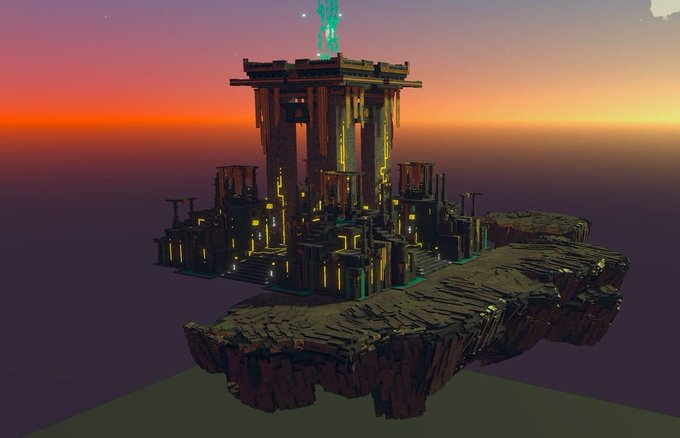
<figure><img src="https://content.gitbook.com/content/83PS3g9zpWmq73xzlwFn/blobs/5fHxOWzUhCNIEe1vm7qL/image.png" alt=""><figcaption><p><a href="https://sandrush.medium.com/shrine-of-truth-an-epic-build-for-the-metaverse-dev-blog-99111605577d">The Shrine of Truth, a 7 piece landmark by Sand Rush and Light Trail Adventures</a></p></figcaption></figure>

## Design Notes&#x20;

{% tabs %}
{% tab title="Characteristics" %}

### Characteristics

* Medium to large size - [**See Sizing & Quality Guidelines**](/en/creator/voxedit/docs/ve-guidelines.md) for details about structures
* Some are designed to allow players to go inside to explore or complete quests
* Some may have animations
* Some may be assembled in Game Maker from multiple assets
  {% endtab %}

{% tab title="Considerations" %}

### Considerations

* The Modeler and Animator have different size limits. Plan the asset carefully based on the limitations of the module you're using:
  * Modeler: \
    256 voxels in 3 dimensions
  * Animator: \
    512 voxels in 3 dimensions for unanimated assets\
    256 voxels in 3 dimensions for animated assets
* Adding an animation to the asset creates a single collision for the Asset, so players will not be able to enter it.
  {% endtab %}

{% tab title="Utility" %}

### Decoration: Players Focus on Quests

* Can be animated, but Models should be compact in design for a tight collision boundary
* Only special use cases should have many nodes and moving parts

### Decoration: Quests and Exploration Can Happen Inside

{% hint style="info" %}
Builders can use blocks to create large structures in square and rectangular shapes and sometimes use building facades for the front and blocks for the rest.\
\
Some builders use walls made in VoxEdit to build larger buildings with angled walls other than 90 degrees.
{% endhint %}

* More space is needed inside (at least 8x8 blocks for a base)
* More steps to build openings for players to pass through
* Animations can NOT be applied (it will create a boundary around the whole asset)

### Component Parts to Assemble

* When positioning the pivot point of a Model, position it to make it easy to snap to the grid in Game Maker for easy placement - 32 voxels per block.
* Test for z-fighting where colors will overlap when pieces are assembled in Game Maker and are intended to overlap (such as an angled corner. Unify coloring where intersecting pieces are intended.
  {% endtab %}
  {% endtabs %}

## Find a Creative Flow

<table data-card-size="large" data-view="cards"><thead><tr><th></th></tr></thead><tbody><tr><td><a href="/en/creator/voxedit/creative-guides/asset-guide/structures-and-landmarks/basic-building-no-entry.md"><strong>Unanimated Basic Building</strong></a><br>- No Entry</td></tr><tr><td><a href="/en/creator/voxedit/creative-guides/asset-guide/structures-and-landmarks/animated-building-no-entry.md"><strong>Animated Building</strong></a><br>- No Entry</td></tr><tr><td><a href="/en/creator/voxedit/creative-guides/asset-guide/structures-and-landmarks/unanimated-building-player-entry.md"><strong>Unanimated Building</strong></a><br>- Player Entry</td></tr><tr><td><a href="/en/creator/voxedit/creative-guides/asset-guide/structures-and-landmarks/landmark.md"><strong>Landmark</strong></a><br>- Animated or Not<br>- Player Entry if unanimated or when multiple parts are assembled</td></tr><tr><td><a href="/en/creator/voxedit/creative-guides/asset-guide/structures-and-landmarks/building-facade.md"><strong>Unanimated Building Facade</strong></a><br>- Player Entry</td></tr><tr><td><a href="/en/creator/voxedit/creative-guides/asset-guide/structures-and-landmarks/structure-component-parts.md"><strong>Structure Component Parts</strong></a><br>- Some may be animated<br>- Player Entry possible when assembled</td></tr><tr><td><a href="/en/creator/voxedit/creative-guides/asset-guide/structures-and-landmarks/modular-architecture.md"><strong>Modular Architecture</strong></a><br>- Player Entry<br>- Designed to be interlocked with itself</td></tr></tbody></table>

{% content-ref url="/pages/axYENdKbUwO6sJhDcrSH" %}
[Art Techniques](/en/creator/voxedit/creative-guides/art-techniques.md)
{% endcontent-ref %}


---

# Agent Instructions
This documentation is published with GitBook. GitBook is the documentation platform designed so that both humans and AI agents can read, navigate, and reason over technical content effectively. Learn more at gitbook.com.

## Querying This Documentation
If you need additional information that is not directly available in this page, you can query the documentation by asking a question.

Perform an HTTP GET request on the following URL with the `ask` and `goal` query parameters:

```
GET https://docs.sandbox.game/en/creator/voxedit/creative-guides/asset-guide/structures-and-landmarks.md?ask=<question>&goal=<user_goal>
```

`ask` is the immediate question: it should be specific, self-contained, and written in natural language.
`goal` is what the user is ultimately trying to achieve, the reason they need the answer. Sharing it helps GitBook give you a better, more relevant answer. A goal is most helpful when it describes the outcome the user wants rather than restating the question. For example, with `ask=how do I create an API token`, a goal like `automate deployments from our CI pipeline` lets GitBook tailor the answer to that use case.

The response will contain a direct answer to the question and relevant excerpts and sources from the documentation.

Use this mechanism when the answer is not explicitly present in the current page, you need clarification or additional context, or you want to retrieve related documentation sections.
